
Integrating AI using Developer Tools for Copilot
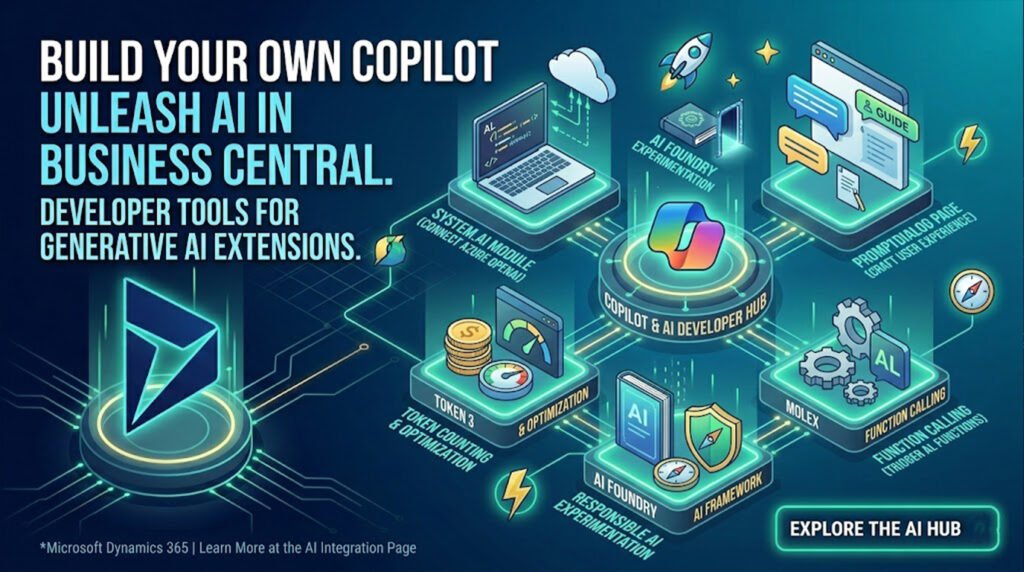
Artificial Intelligence is no longer just a buzzword; it is a fundamental building block of modern business applications. Microsoft is accelerating this shift by equipping developers with a robust set of tools to weave generative AI and Copilot experiences directly into Dynamics 365 Business Central.
For developers and organizations looking to move beyond out-of-the-box features, the Developer Tools for Copilot open up a new world of possibilities. You can now build custom AL (Application Language) extensions that harness the power of AI to automate tasks, generate insights, and interact with users through natural language.
Here is a breakdown of what the developer toolkit includes and how you can start building custom Copilot capabilities today.
1. Extending Copilot with AL
Microsoft provides a dedicated AI module (System.AI) within the base application, serving as the bridge between your Business Central environment and powerful generative AI models. Developers can use this module to connect seamlessly to the Azure OpenAI Service, allowing you to bring advanced capabilities—like text summarization, data analysis, and predictive suggestions—directly into your custom workflows.
2. Crafting the User Experience
To ensure that custom AI features feel native to Business Central, Microsoft introduced the PromptDialog page type. This allows developers to create standard, intuitive conversational interfaces.
-
Prompt Guides and Floating Action Bars: You can build user experiences that guide employees on how to prompt the AI effectively, ensuring they get the best results without needing to be “prompt engineers.”
-
Built-in Error Handling: The tools come with native error handling for prompt dialogs, ensuring that if an AI model encounters an issue or hits a token limit, the user is guided gracefully to a solution.
3. Advanced Capabilities: Function Calling and Token Counting
Developing reliable AI tools requires precision. The developer toolkit includes advanced features to optimize how your extensions interact with Language Models (LLMs):
-
Function Calling: You can configure the AI to trigger specific AL functions based on user intent. For example, if a user types, “Update the inventory levels for Item A,” the Copilot can map that natural language request directly to your custom inventory-update codeunit.
-
Token Counting: To manage API costs and optimize performance, the tools provide token counting mechanisms, giving developers control over the size and scope of the data being sent to and received from the LLMs.
4. Zero-Code Influence on Agents
Not every AI enhancement requires deep coding. The latest updates also outline concepts for influencing Copilot and autonomous agents without extending them. By optimizing your data structures, standardizing workflows, and refining how your fields are labeled, you can improve how the native Copilot interprets your specific business environment out-of-the-box.
5. Responsible AI at the Core
With great power comes the need for governance. Microsoft emphasizes ethical development by integrating frameworks for Responsible AI. Developers have access to the Azure AI Foundry portal for safe experimentation, ensuring that the custom Copilot features you build adhere to transparency, privacy, and security standards.
Getting Started
Ready to build your first AI-powered AL extension? The best place to start is by setting up your Azure OpenAI Service connection and exploring the sample extensions available in the BCTech GitHub repository.
By leveraging these developer tools, you can transform Business Central from a reactive system of record into a proactive, intelligent partner tailored precisely to your unique operational needs.
Dive into the complete documentation, tutorials, and code samples on the Microsoft Learn Copilot Integration Hub.
To get more such useful information, please follow our LinkedIn page and you can also subscribe our you tube page.
YouTube Link: https://www.youtube.com/@bizcentralorbit
LinkedIn Link: https://www.linkedin.com/company/bizcentralorbit/posts/?feedView=all
If you want more updates and daily Blogs like “Can We Delete Posted Documents in Business Central?” click the link: https://bizcentralorbit.com/can-we-delete-posted-documents-in-business-central/
If you want more Demo and Tutorial videos like “Environment Transfers in Business Central” on Youtube click the link: https://www.youtube.com/watch?v=K0wq7UPivTs
Raise a support ticket instantly by clicking the link: https://bizcentralorbit.com/contact-us/
Want to analyze any requirement and collaborate? Let’s work together to deliver the best solution! Please submit the details here: https://bizcentralorbit.com/bc-consultants/
Really helpful for fine tuning Business Central setup
The workflow explanation here is very easy to follow, good job.
Helpful and informative saved me a lot of time figuring this out.
Nicely explained without making the topic unnecessarily technical.
The step-by-step guidance here is genuinely helpful.
This cleared up a lot of small doubts I had.
Honestly one of the best platforms I have used lately. The game variety is insane and the bonuses are actually helpful. Highly recommend phwwwcasinoplus for anyone who loves action.
Finally found a login page that doesn’t glitch out. The process is straightforward and it gets me straight to the games. Great job on okbetcomlogin.
Such a fun experience! The promotions they offer are actually fair and the registration process was a breeze. I am loving the vibes here. jilibeecasino
Login is always fast and secure. I don’t have to worry about my account getting locked out. jiliflogin makes the whole process stress free.
I’ve been looking for a reliable way to access my account and this site is definitely the smoothest. The interface is clean and the login process is super fast. Highly recommend checking out djarumgacorlogin for a better experience.
Finally found a place where the login process is actually fast and doesn’t glitch out. Everything works perfectly on 59phlogin, definitely staying here.
Fast deposits and even faster withdrawals. That is all I really care about and this site delivers. br6733aa is my new go-to site.
No more hassle with account access! The login page is stable and works perfectly on my mobile. Cheers to 8jilibetlogin.
I’ve been playing here for a while now and the withdrawal process is surprisingly fast. Definitely one of the most reliable platforms I’ve found recently. Check out vnhn88 for a great experience.
Solid experience so far. The loading times are short and the gameplay is fluid. Definitely my new go-to spot bdacc444
Finally found a platform that doesn’t lag during peak hours. The registration was quick and everything works as promised. Great job bdnogad88!