
Bringing Ambient AI to the Forefront: The Security Copilot Inclusion for Microsoft 365 E5 and E7
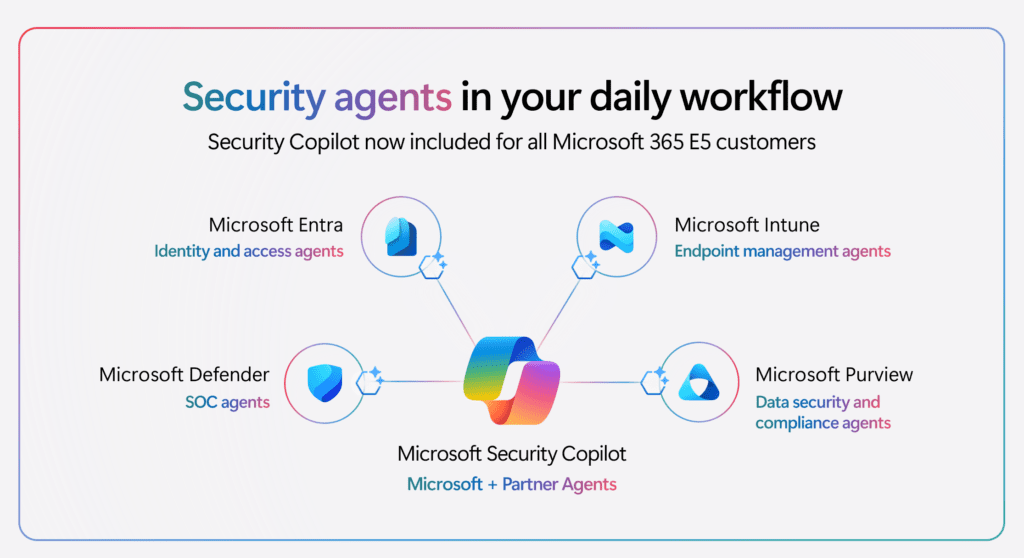
As cybersecurity threats grow more sophisticated, the tools used to defend against them must evolve to be faster, smarter, and seamlessly integrated into daily workflows. At Ignite 2025, Microsoft announced a monumental shift in how organizations will access generative AI for security: Security Copilot is now included at no additional cost for all Microsoft 365 E5 and E7 customers.
This update moves Security Copilot from a standalone, consumption-billed add-on to an ambient, built-in capability. Here is a comprehensive overview of how the new inclusion model works, how capacity is allocated, and what to expect during the rollout.
1. Zero-Click Activation and Auto-Provisioning
Historically, setting up Security Copilot required linking an Azure subscription and manually provisioning Security Compute Units (SCUs) on an hourly basis. The new inclusion model completely eliminates this friction for eligible E5 and E7 customers.
Through zero-click activation, Security Copilot is provisioned automatically as part of your existing subscription. There is no Azure setup needed, and capacity is configured for you in the background. As the rollout hits your tenant, Microsoft handles the creation of a default workspace, sets the prompt evaluation locations, and establishes default data sharing preferences (which administrators can easily adjust later).
2. Understanding the Inclusion Capacity Model
Under the previous paid model, organizations provisioned SCUs hourly, meaning they were billed for capacity whether they actively used the AI during that hour or not.
The inclusion model introduces a much more flexible, usage-based approach tied to your license count:
Monthly SCU Allocation: Microsoft provides a baseline of 400 SCUs per 1,000 user licenses every month. This amount scales directly with your user count (e.g., an organization with 4,000 licenses receives 1,600 SCUs monthly). This allocation applies even to organizations with fewer than 1,000 licenses.
Consumption-Based: Instead of an hourly burn rate, SCUs are only deducted from your monthly allocation when Security Copilot is actively used (e.g., running an embedded experience, using the standalone portal, or invoking agents).
Monthly Reset: It is important to note that SCU allocations reset at the beginning of each month and do not roll over.
3. Deep Integration Across the Security Portfolio
The true power of this inclusion is that it places “agentic AI” directly into the tools your security, compliance, and IT teams are already using. Security Copilot agents are now natively embedded into:
Microsoft Defender: Automating routine triage, investigating incidents, and shifting teams from reactive response to proactive threat hunting.
Microsoft Entra: Providing AI-assisted identity management, such as analyzing access reviews and troubleshooting sign-ins using natural language.
Microsoft Purview: Enhancing data security and compliance tracking.
Microsoft Intune: Allowing endpoint administrators to extract device insights, monitor tenant health, and take action without leaving the Intune admin center.
4. Rollout and Next Steps
The rollout for this inclusion began on November 18, 2025, starting with existing Microsoft 365 E5 customers, and is continuing to deploy across all E5 and E7 tenants globally.
How do you know if you have access?
Administrators will receive a 30-day (or 7-day for some existing setups) advanced notification in the Microsoft 365 admin center before activation. Once active, you will see in-product banners directly within Defender, Purview, Entra, Intune, or the standalone Security Copilot portal indicating that the features are ready to use.
By removing the cost barrier and operational friction, Microsoft is democratizing access to top-tier security AI. For E5 and E7 customers, this inclusion means your security operations are about to get significantly faster, smarter, and more proactive.
For detailed guidance on adjusting your auto-provisioned workspace settings, managing RBAC roles, and monitoring your SCU usage, visit the official Security Copilot inclusion documentation on Microsoft Learn.
To get more such useful information, please follow our LinkedIn page and you can also subscribe our you tube page.
YouTube Link: https://www.youtube.com/@bizcentralorbit
LinkedIn Link: https://www.linkedin.com/company/bizcentralorbit/posts/?feedView=all
If you want more updates and daily Blogs like “Can We Delete Posted Documents in Business Central?” click the link: https://bizcentralorbit.com/can-we-delete-posted-documents-in-business-central/
If you want more Demo and Tutorial videos like “How to create Special Order in Business Central” on Youtube click the link: https://www.youtube.com/watch?v=qFj_ECsOVrY
Raise a support ticket instantly by clicking the link: https://bizcentralorbit.com/contact-us/
Want to analyze any requirement and collaborate? Let’s work together to deliver the best solution! Please submit the details here: https://bizcentralorbit.com/bc-consultants/
Great to see AI being integrated so effectively into security solutions
Yo, vipphlogin is where it’s at! Been hitting it up and the vibes are legit. Solid platform with some cool games. Check it out vipphlogin.
Yo! Just found w567game and it’s lowkey fire Honestly, I’m having a blast, and the features are pretty sweet. Give it a shot w567game.
Aight, wagipluss is the real deal! If you’re looking for some fun, this is your spot. The selection is diverse. Level up your game at wagipluss.
The variety of options here is just insane. I love how everything loads so quickly without any lag. Give brwinxx a try if you want a reliable platform.
Finally found a platform that doesn’t lag during peak hours. The interface is super smooth and easy to navigate. Highly recommend krikialogin to everyone.
Really impressed with the own customer support here. They answered my questions almost instantly. Highly recommend it for anyone looking for a reliable place. vnperpa88
Super smooth gameplay and the graphics are amazing. It feels very professional and safe. I am really enjoying my time on this platform. jililovelogin
Getting the APK was a breeze. No complicated steps and it installed perfectly on my device. Highly recommended for everyone. lucky93gamedownloadapk
The odds on this site are way better than what I usually find. I did a few live bets this weekend and the experience was seamless. Cheers to 1pra1betsite for the great service.
Finally a site where the login process is actually straightforward and doesn’t lag. It makes getting into the action so much easier. Love the efficiency here. koin138login
I’ve been playing here for a few weeks now and the payouts are surprisingly fast. Really liking the vibe of maxwincasino so far!
The excitement here is on another level. I love how diverse the game library is. I will definitely keep coming back to bet2888game.
Such a fun experience! I love how easy it is to get started and the graphics are actually quite impressive. nutristargame is awesome.
Finally found a login link that actually works without any redirects. Great service and the support team is very responsive. Give nibung88login a try.
Solid platform with a very user friendly layout. I appreciate how easy it is to manage my funds. idnaga169 is definitely my new go to site.