
Microsoft 365 Copilot Plugin Development: The New Era of AI Extensibility (2026 Updates)
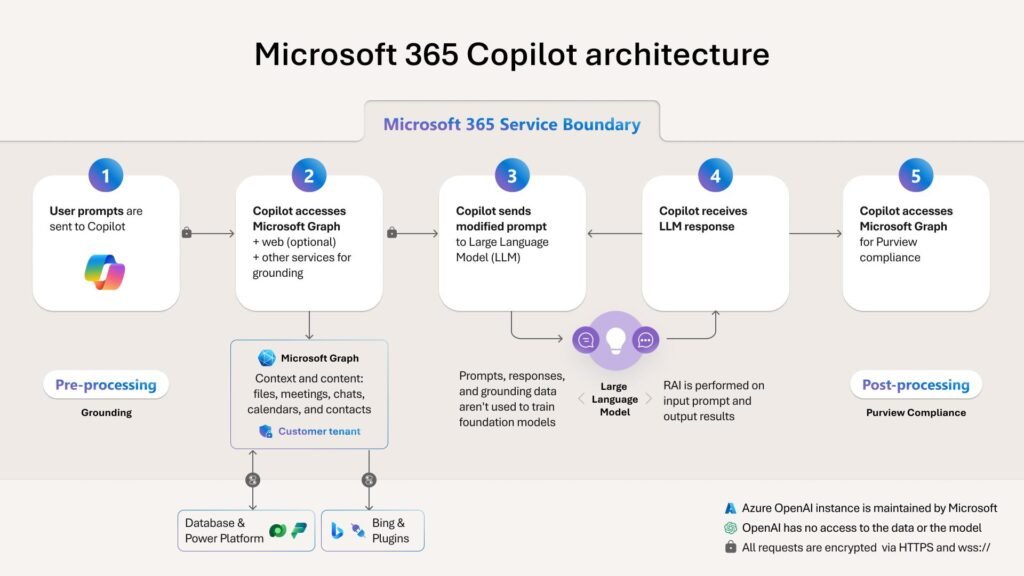
In today’s digital landscape, AI has evolved from a simple tool into a true “co-worker.” Microsoft 365 Copilot has redefined business productivity, but its true power lies in its Extensibility. For developers and tech organizations, building plugins and agents for Copilot is currently the most significant opportunity to integrate proprietary business logic into the world’s most used productivity suite.
This article explores the latest updates in Microsoft 365 Copilot plugin development and what they mean for your business.
1. Understanding Copilot Extensibility: Plugins vs. Agents
Microsoft has designed Copilot to be an open ecosystem where developers can bridge the gap between AI and internal company data.
-
Plugins: These act as “skills” for Copilot. They allow the AI to interact with external software, such as pulling real-time data from an ERP system or updating records in a CRM.
-
Declarative Agents: These are specialized, high-functioning versions of Copilot tailored for specific domains or tasks, utilizing specific knowledge bases and instructions to provide expert-level assistance.
2. The Latest Milestone: GPT-5 Integration
Microsoft has recently integrated GPT-5 models (including both “Thinking” and “Instant” variants) into the Copilot framework. This update has a profound impact on plugin development:
-
Advanced Reasoning: Plugins can now handle multi-step, complex logic that was previously difficult for AI to navigate.
-
Near-Zero Latency: With GPT-5.3 Instant, the response time for custom plugins has been significantly reduced, providing a seamless user experience.
3. New Developer Tools (2026 Highlights)
Several major features have been added to the developer ecosystem to streamline the creation of AI agents:
-
Build-with-Agents Toolkit: A streamlined environment that allows developers to create, test, and deploy declarative agents with minimal overhead.
-
Interactive UI Widgets: Developers can now embed interactive elements (like buttons, dynamic cards, and forms) directly within the Copilot chat interface, allowing users to take action without leaving the app.
-
Copilot Studio Synchronization: Custom agents can now be seamlessly ported to Copilot Studio, enabling advanced workflow orchestration and deeper custom integrations.
4. Expansion of the Model Context Protocol (MCP)
A major breakthrough this year is the full support for the Model Context Protocol (MCP). This allows your custom-built applications to provide a live, interactive experience within the Copilot chat. Whether it is creative work in Adobe Express or complex data management in Dynamics 365, MCP ensures the AI has the full context of the third-party application.
5. Enterprise-Grade Security and Governance
As the plugin ecosystem grows, Microsoft has doubled down on security to protect corporate data:
-
Microsoft Purview DLP: All developer-created plugins are now governed by Data Loss Prevention (DLP) policies, ensuring that sensitive organizational data is never leaked to unauthorized models.
-
Granular Admin Control: Through the new Package Management API, IT administrators can now approve, block, or audit specific agents and plugins across the entire organization.
6. Why This Matters for Your Organization
If your company operates within the Microsoft ecosystem, developing custom plugins is no longer optional—it is a competitive necessity. By connecting Copilot to your unique business data, you can:
-
Automate complex scheduling in Outlook.
-
Perform deep-dive data analysis in Excel using internal proprietary formulas.
-
Generate creative briefs in Word based on historical company archives.
Conclusion
Microsoft 365 Copilot plugin development has shifted from basic chat responses to sophisticated, decision-making capabilities. With the power of GPT-5 and the flexibility of the new developer toolkits, now is the ideal time to make your services and internal tools “Copilot-ready.”
Is there a specific technical section from the documentation you would like me to expand on, such as the authentication process or the manifest file structure?
Official Resource: For detailed API references and development steps, visit the Microsoft Copilot Developer Portal.
To get more such useful information, please follow our LinkedIn page and you can also subscribe our you tube page.
YouTube Link: https://www.youtube.com/@bizcentralorbit
LinkedIn Link: https://www.linkedin.com/company/bizcentralorbit/posts/?feedView=all
If you want more updates and daily Blogs like “Can We Delete Posted Documents in Business Central?” click the link: https://bizcentralorbit.com/can-we-delete-posted-documents-in-business-central/
If you want more Demo and Tutorial videos like “Environment Transfers in Business Central” on Youtube click the link: https://youtu.be/K0wq7UPivTs?si=ouxFMamq8Pl2K9S4
Raise a support ticket instantly by clicking the link: https://bizcentralorbit.com/contact-us/
Want to analyze any requirement and collaborate? Let’s work together to deliver the best solution! Please submit the details here: https://bizcentralorbit.com/bc-consultants/
Well explained, really useful
Had a massive win here last night and the payout was processed without any hassle. It’s hard to find reliable sites these days but phlwincasino is definitely one of them.
The lite version is exactly what I needed for my older phone. It runs perfectly without lagging at all. Get it at bingoplusliteappdownload.
Very impressive system and a very smooth user experience. Everything is well organized and easy to navigate. Five stars for senja128login
Really impressed with the interface here. Everything is laid out perfectly and the loading speeds are impressive. Great spot for anyone looking for a reliable site. c333com
The app is incredibly lightweight and doesn’t lag even on my old phone. Perfect for gaming on the go. Check out bdxbajeeapp if you want a seamless mobile experience.
Was struggling to find the official download link but this site made it so easy. The app is lightweight and runs perfectly on my old phone. Visit ok777betappdownload to get started.