
Microsoft Unveils Unified Financial Model for Service Work in Dynamics 365
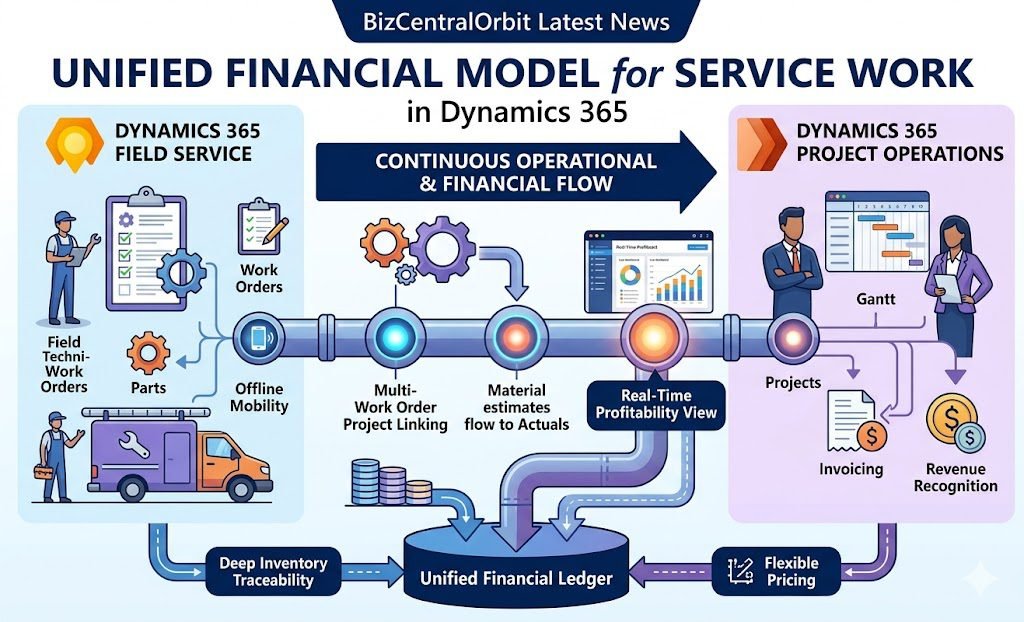
Managing complex service work just got a massive operational and financial upgrade. Microsoft has officially announced the General Availability (GA) of interoperability between Microsoft Dynamics 365 Field Service and Microsoft Dynamics 365 Project Operations. This highly anticipated update bridges the historic gap between service execution in the field and the financial tracking that follows, enabling service organizations to manage both halves within a single, continuous model.
Traditionally, work orders have been isolated transactions. Technicians complete a repair or installation, and the resulting costs, revenue, and progress are tracked entirely separately, often leading to delayed financial visibility and time-consuming manual reconciliation. With this latest update, work orders are now connected to a broader operational and financial framework.
What’s New: Connecting the Field to Finance
This continuous, connected experience gives businesses an ongoing view of profitability. Instead of waiting until a multi-week installation is over to reconcile costs, organizations can spot trends—such as parts consumption running ahead of estimates, cost overruns, or margin erosion—while the engagement is still actively in flight.
Here are the standout capabilities of this newly unified model:
-
Multi-Work Order Project Linking: Multiple work orders (including those generated by Field Service Agreements) can now be linked to a single project. Both reactive and planned service work can finally contribute to the same project delivery.
-
Material Estimates and Usage to Actuals: Estimated quantities entered on a work order seamlessly flow into Project Operations as material estimates. As technicians mark parts and services as used in the field, these logs are captured, approved, and immediately generate project actuals to reflect the true financial impact.
-
Quantity Used vs. Quantity Billed: Technicians are now empowered to accurately record the exact quantity of materials used, even if the billing structure requires invoicing for a different quantity.
-
Offline Mobility: Technicians working in remote areas can capture their material usage completely offline. The system automatically syncs their operational data and financial updates as soon as connectivity returns.
-
Deep Inventory Traceability: For deployments utilizing Project Operations and Finance, any parts tracked via serial and batch control remain fully traceable across both service records and financial systems. Furthermore, work order transactions will now respect finance-defined dimensions, warehouses, and sites.
-
Flexible Pricing and Discounts: Organizations can configure whether their pricing originates from Field Service or Project Operations, and percentage-based discounts applied on a work order line will effortlessly flow through to final financial records and invoicing.
Flexible Deployment for Any Organization
Microsoft has designed this interoperability to support different overarching operational landscapes:
-
Project Operations Core: Project Operations handles project financials and invoicing, while Field Service acts as the system of record for inventory.
-
Project Operations and Finance Deployments: Finance and Supply Chain Management take over as the system of record for accounting and inventory, while Field Service and Project Operations strictly manage the operational execution and project tracking.
Both deployment models leverage the modern Project Operations architecture, which introduces a structured financial hierarchy tailor-made for service-centric operations.
What This Means for You
For service providers handling large-scale equipment installations, multi-week preventive maintenance, or complex repairs, this update represents a paradigm shift. Operational records are no longer disconnected from your bottom line. Execution now flows through a unified financial lifecycle—from estimates and forecasts all the way to invoicing and revenue recognition.
Stay tuned to BizCentralOrbit for more insights and implementation guides as we explore how to configure these new capabilities in your Dynamics 365 environment.
To get more such useful information, please follow our LinkedIn page and you can also subscribe our you tube page.
YouTube Link: https://www.youtube.com/@bizcentralorbit
LinkedIn Link: https://www.linkedin.com/company/bizcentralorbit/posts/?feedView=all
If you want more updates and daily Blogs like “Can We Delete Posted Documents in Business Central?” click the link: https://bizcentralorbit.com/can-we-delete-posted-documents-in-business-central/
If you want more Demo and Tutorial videos like “Environment Transfers in Business Central” on Youtube click the link: https://youtu.be/K0wq7UPivTs?si=jsTDoYuw4gzSVixm
Raise a support ticket instantly by clicking the link: https://bizcentralorbit.com/contact-us/
Want to analyze any requirement and collaborate? Let’s work together to deliver the best solution! Please submit the details here: https://bizcentralorbit.com/bc-consultants/
Win888soicau isn’t too bad. Pretty standard setup, but the odds seem fair. Depositing was easy, it recognized my card details immediately so I’ll continue to test it out. Have a look at win888soicau to see if you agree.
Hey amigos, xbetsmx popped up on my radar. Threw a few pesos their way and had a decent experience. Nothing groundbreaking, but solid enough. Give it a look-see if you’re feeling lucky. More info here: xbetsmx
Nbetmexico… Hecho en Mexico? Good! They’ve got some cool localized games. Customer service was helpful when I had a question. I’ll be back: nbetmexico
Solid platform with a great community feel. I appreciate the customer support being so responsive to my questions. Keep it up pkwin988!
Really impressed with the fast payouts here. The interface is smooth and I had a great run last night. Definitely checking out krwinbet30 again soon!
I’ve tried a few sites but this one is definitely the smoothest. The payouts are fast and the games are top notch. Highly recommend bk8ph to anyone looking for a reliable spot.
Super friendly community and great game selection. I’ve tried many sites but this one feels the most honest. Five stars for kk77bet.
What a wonderful surprise this place turned out to be. The gameplay is super responsive and every session feels fresh and exciting. I really appreciate how the community here keeps things positive and supportive. Whether you are a casual player or chasing those big wins, you will find your rhythm here in no time. Trust me, you will want to stick around in99oxgame
Great platform with a very user friendly design. I feel safe depositing here and the wins are real. Check out nogad88app!
Really glad I stumbled upon this platform. The interface is super clean and the registration process was a breeze. Highly recommend idsanur999 for anyone wanting a smooth experience.
The app installation was a breeze and the login process is super fast. It makes the whole experience much more convenient on mobile. superlgloginappapk
The app is lightweight and doesn’t crash, which is exactly what I need. The login is seamless every time. Love using 95jiliapplogin.
Really enjoying the bonuses they offer. It gives me a much better chance to win big. Visit vnhm88net now
The registration process took me less than two minutes. I am impressed with how streamlined everything is here. idarea188 is definitely a keeper.
Best spot for sports and slots combined. I love that I don’t have to switch accounts to bet on my favorite team. idbolaslot88 is definitely a top-tier choice.
The app performance is top notch. Everything loads instantly and the graphics are crisp. It makes the whole experience so much more immersive. Check 8999vetapp out.
Finally found a site that actually treats its VIP players well. The bonuses are generous and fair. Give vipphfunlogin a try.
Really loving the vibe here. The games are exciting and I’ve managed to hit a few decent wins already. It is just a great place to hang out and play. Visit bancanohuonline
The login process is seamless and the customer support is surprisingly responsive. It is a very trustworthy site. Log in via vnnk88dangnhap today.
Consistency is key and this site provides exactly that. No crashes and very reliable servers. betgame365 is the real deal.
I’ve been playing here for a few weeks now and the interface is super smooth. Fast payouts and no hassle with the login process. Definitely recommend 877jililogin for anyone looking for a reliable site.