
Power Platform for Admins V2
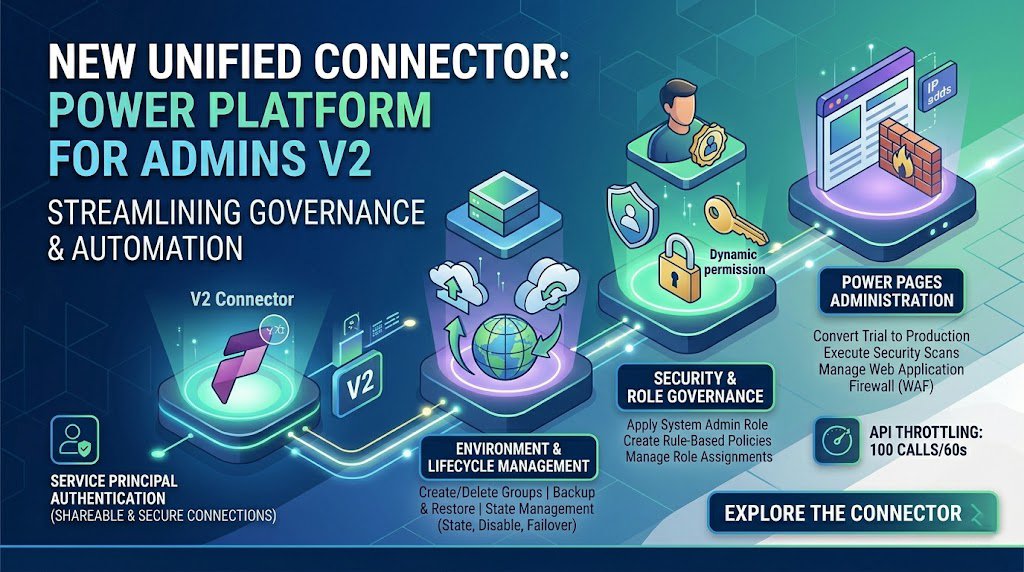
Managing a sprawling Microsoft Power Platform ecosystem just got more efficient. For IT professionals and administrators seeking tighter control and automation over their environments, the Power Platform for Admins V2 connector represents the next evolution in control plane management.
Routinely refreshed to capture the latest capabilities directly from the Power Platform admin center API, this unified connector provides the essential actions you need to govern your tenant, environments, and applications securely.
Here is a closer look at the key features, use cases, and actions available with the Power Platform for Admins V2 connector.
The Unified Control Plane
The V2 connector is designed to be the go-to tool for administrative automation across Power Apps, Power Automate, Logic Apps, and Copilot Studio. It allows administrators to build flows that orchestrate environment lifecycles, manage security policies, and monitor capacity.
Authentication: The connector prominently supports Service Principal authentication for most actions. This enables shareable, highly secure connections that are ideal for enterprise-level automation where flows are managed by service accounts rather than individual users. (Note: Standard OAuth connections are still supported and are required for certain actions, such as managing Billing Policies).
Key Capabilities and Use Cases
The V2 connector boasts a massive library of actions designed to automate complex governance scenarios. Here are some of the primary categories of capabilities:
1. Environment & Lifecycle Management Administrators can automate the creation, backup, and deletion of environments. Key actions include:
-
Create/Delete Environment Groups: Group environments for easier policy application.
-
Backup & Restore: Automate
Create a backup of the specified environmentand manage disaster recovery settings (Preview). -
Environment Copying: Automate the process of copying an environment from a source to a target (Preview).
-
State Management: Enable, disable, or force failovers for specific environments.
2. Security and Role Governance Managing who has access to what is critical. The connector allows you to programmatic control over permissions:
-
Assign Admin Roles: Automatically
Apply the system administrator roleto selected users based on ticketing requests. -
Rule-Based Policies: Create and assign rule-based policies and Rule Sets to environments and environment groups.
-
Role Assignments: List, create, and delete role assignments and definitions (Preview).
3. Power Pages Administration The connector offers dedicated actions for managing external-facing Power Pages websites:
-
Lifecycle Control: Create, list, delete, or convert a trial Power Pages website to production.
-
Security Scanning & Firewalls: Execute quick or deep security scans, and enable, disable, or modify Web Application Firewall (WAF) rules and allowed IP addresses.
4. Capacity and Billing Policy Management Keep your tenant’s licensing and consumption in check by automating billing oversight:
-
Billing Policies: Create, get, and delete billing policies at the tenant level, and link environments to these policies (Requires OAuth).
-
Capacity Insights: Retrieve flow context summaries for a specific user’s per-flow capacity source to track usage.
5. Monitoring & Recommendations Stay ahead of compliance and health issues with automated reporting:
-
Cross-Tenant Reports: Generate, fetch, and list cross-tenant connection reports to see where data might be flowing outside your organization.
-
Recommendations: Execute or retrieve recommendation resources generated by the Power Platform (requires Managed Environments).
Things to Keep in Mind
When building automation with the Power Platform for Admins V2 connector, keep the standard API throttling limits in mind: the connector allows 100 API calls per connection every 60 seconds.
Whether you are looking to automate user onboarding by instantly assigning admin roles, or you want to build a weekly flow that audits and disables dormant environments, the V2 connector is a foundational tool for enterprise governance.
For the complete list of actions, parameters, and setup instructions for Service Principals, check out the official Microsoft Power Platform for Admins V2 documentation.
If you want more updates and daily Blogs like “Can We Delete Posted Documents in Business Central?” click the link below:
link: https://bizcentralorbit.com/can-we-delete-posted-documents-in-business-central/
If you want more Demo and Tutorial videos like “How to use FilterGroup in AL Language Business Central” on Youtube click the link below:
link: https://www.youtube.com/watch?v=xULnn5aTLPM
Raise a support ticket instantly by clicking the link below: