
Prototyping the Future: An Overview of the AI Development Toolkit for Business Central (Preview)
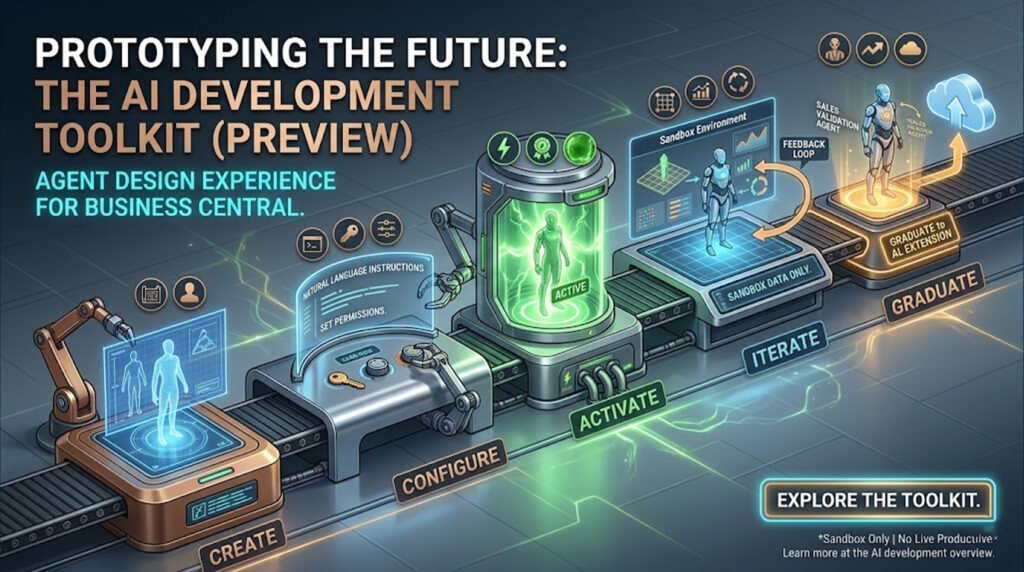
Microsoft continues to push the boundaries of ERP capabilities with its ongoing investments in artificial intelligence. The latest addition for technical teams is the AI Development Toolkit for Business Central, specifically focusing on the new Agent Design Experience (currently in Preview).
This toolkit is designed as a safe, experimental sandbox for product owners, domain experts, consultants, and developers to prototype AI-powered features and autonomous agents before committing to full-scale AL code development.
Here is everything you need to know about this new prototyping environment.
1. What is the AI Development Toolkit?
The toolkit provides a no-code/low-code design surface within Business Central where teams can rapidly build, test, and refine AI agents. It allows you to see exactly how an AI can interpret natural language, navigate the Business Central user interface, interact with data, and automate workflows.
Who is it for?
-
Product Owners: Prototyping features before handing requirements to developers.
-
Domain Experts: Evaluating how AI can solve specific industry or operational bottlenecks.
-
Consultants: Demonstrating automated AI scenarios to clients.
-
Developers: Validating use cases and tuning prompts prior to building production-ready AL extensions.
2. The Agent Lifecycle
Building a prototype agent in the toolkit follows a clear, structured lifecycle:
-
Create: Establish the agent’s basic identity and profile.
-
Configure: Define natural language instructions and set permissions.
-
Activate: Enable the agent and assign it specific tasks.
-
Iterate: Test the agent, refine its instructions, and adjust its access rights based on its performance.
-
Graduate: Take the learnings, prompts, and configurations from the prototype and export them to build a production-grade AL extension.
-
Clean Up: Deactivate and delete the prototype.
3. Core Concepts: Instructions, Tasks, and Profiles
To build an effective agent, you must understand how it interacts with the system.
-
Instructions: These are the natural language prompts that dictate the agent’s behavior, purpose, and context. Well-written instructions are the secret to an agent that interprets requests accurately.
-
Tasks: These are the triggers that prompt the active agent to respond to specific types of requests or workflows.
-
Profiles & Permissions: The toolkit adheres strictly to the principle of least privilege. You assign an agent a specific profile (role) and explicit permission sets. Best Practice: Create custom profiles just for agents. By using page customization to hide irrelevant actions, views, and lists, you reduce “contextual noise,” making the agent much more accurate and efficient.
4. Important Prerequisites and Limitations
Because this is a powerful preview feature, Microsoft has implemented several guardrails:
Prerequisites:
-
You must be operating in a Sandbox Environment (Version 27.2 or later). This feature is completely disabled in production.
-
You need specific admin permissions (
AGENT - ADMINandAGENT - DIAGNOSTICS) to design and monitor agents. -
Your tenant must have billing setup configured for agent capabilities.
Limitations:
-
Sandbox Only: You can use copies of production data, but the agents cannot be run in live production environments.
-
UI Interactions: Agents can only see what their assigned profile allows. Furthermore, an agent can currently only interact with one list per page (e.g., if a page has both sales lines and a notes factbox, it can only access one).
-
No “Tell Me”: Agents cannot use the global “Tell Me” search function to find information; they must navigate via available actions and links within their profile.
-
Language: The preview currently only supports English.
Start Experimenting Today
The AI Development Toolkit represents a massive leap forward in how teams can conceptualize and design ERP automation. By lowering the barrier to entry for AI prototyping, organizations can validate use cases rapidly and ensure that when they do build AL extensions, they are building highly optimized, proven solutions.
Ready to build your first prototype agent? Check out the full documentation on the Microsoft Learn AI Development Toolkit Overview.
To get more such useful information, please follow our LinkedIn page and you can also subscribe our you tube page.
YouTube Link: https://www.youtube.com/@bizcentralorbit
LinkedIn Link: https://www.linkedin.com/company/bizcentralorbit/posts/?feedView=all
If you want more updates and daily Blogs like “Can We Delete Posted Documents in Business Central?” click the link: https://bizcentralorbit.com/can-we-delete-posted-documents-in-business-central/
If you want more Demo and Tutorial videos like “How to create Special Order in Business Central” on Youtube click the link: https://www.youtube.com/watch?v=qFj_ECsOVrY
Raise a support ticket instantly by clicking the link: https://bizcentralorbit.com/contact-us/
Want to analyze any requirement and collaborate? Let’s work together to deliver the best solution! Please submit the details here: https://bizcentralorbit.com/bc-consultants/
Quick read but very informative
This helped me understand the logic behind the process, not just the steps.
Great work! Looking forward to more content like this.
This post gave me a clearer understanding of the overall workflow.
This is one of the more practical Dynamics blogs I’ve come across recently.
Clear and concise preparation guide
This is the type of Dynamics content that actually helps during projects.
Good to see content that focuses on real project scenarios.
What a refreshing change of pace. I used to jump around between apps but this one keeps me settled. Deposits hit instantly and the game library keeps me entertained for hours. Definitely worth your time br707betwin
Salam mates, if you are searching for a trustworthy gaming destination in Pakistan you will love pkwizary. The registration is quick and the bonus structure is very player friendly. I enjoy the slot games the most because they update their library every week. Start your adventure pkwizary
Finding a genuinely official sports betting site has been a struggle for me until now. This platform keeps everything straightforward and honest from registration to payout. I really enjoy the clean design and how quickly they handle my requests without unnecessary paperwork. tipobetresmi
If you are looking for a place with a huge selection of slots and great rewards then this is it. I am having a blast on brpgwin.
I’ve tried a few platforms recently but this one really stands out. The interface is smooth and the payouts are fast. Definitely worth checking out krmegawin777
The app is incredibly stable and the localization for Korea is spot on. It makes the whole experience much more convenient for us. betwinnerkoreaapp
Really impressed with the variety of options here. It feels very professional and secure, which is exactly what I look for. Five stars for vnvj88.
Honestly one of the best gaming experiences I have had in a while. The payouts are fair and the variety of games is impressive. Check out zerumbetcassino if you want real excitement.
Great variety of options here. I really appreciate how easy it is to navigate the site even if you are a beginner. pkbet55