
Trigger Post-Call Actions Using Caller Hang-Up Events
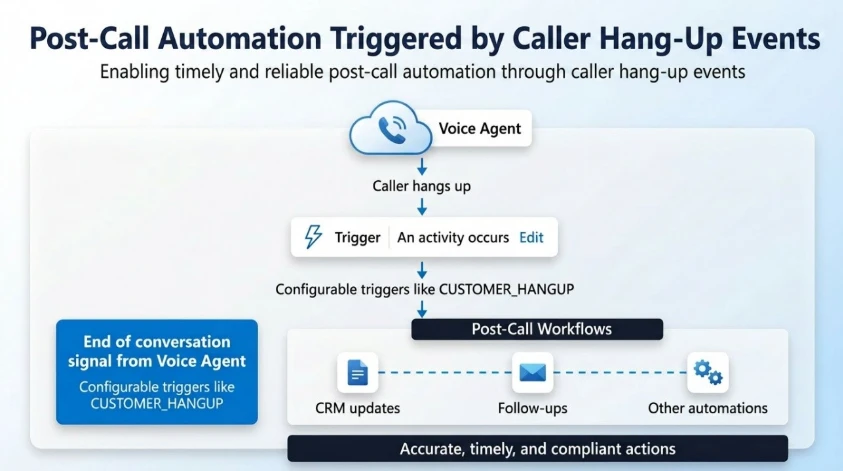
Overview: The article introduces a new feature in Dynamics 365 Contact Center and Copilot Studio that allows for real-time, event-driven automation triggered by caller hang-up events. Traditionally, the work following a customer call (like logging outcomes, updating CRM systems, or triggering workflows) has been manual, delayed, or reliant on complex custom external orchestrations.
The Problem Being Addressed: Without a reliable trigger when a call ends—especially if a customer hangs up unexpectedly mid-flow—organizations often face:
-
Missed or delayed post-call actions.
-
Inconsistent or stale data in CRM systems (e.g., records remaining locked).
-
Gaps in reporting and operational workflows.
How the New Feature Works: Voice agents can now actively “listen” for the end of a conversation and trigger actions directly within their Copilot Studio flow based on how the call ended.
At the end of a call, the platform emits a structured event:
-
Activity type: End of conversation
-
Context/EndReason: e.g.,
CUSTOMER_HANGUP
Makers can configure logic in Copilot Studio (e.g., “When activity = End of conversation AND EndReason = CUSTOMER_HANGUP, execute workflow”). This applies not only to customer hang-ups but also to call transfers to external numbers or escalations to human agents.
Key Benefits & Real-World Use Cases:
-
Immediate Execution: Workflows trigger the second the call disconnects, eliminating delays.
-
Automated Updates & Follow-ups: Automatically unlock or update CRM records and immediately trigger follow-up SMS, emails, or callbacks.
-
Drop-off Detection: Identify if a customer abandoned a critical flow (like a payment or authentication process) and automatically initiate recovery or risk-handling actions.
-
Enhanced Governance: Accurate call termination signals provide better telemetry, reporting, and insights into customer experiences and escalation tracking.
This update provides contact centers with a deterministic and reliable event model for post-call automation, significantly reducing friction in operations.
To get more such useful information, please follow our LinkedIn page and you can also subscribe our you tube page.
YouTube Link: https://www.youtube.com/@bizcentralorbit
LinkedIn Link: https://www.linkedin.com/company/bizcentralorbit/posts/?feedView=all
If you want to book a 1-to-1 live session with any of our expert consultants then click the link: https://bizcentralorbit.com/#One-to
If you want more updates and daily Blogs like “Can We Delete Posted Documents in Business Central?” click the link: https://bizcentralorbit.com/can-we-delete-posted-documents-in-business-central/
If you want more Demo and Tutorial videos like “How to create Special Order in Business Central” on Youtube click the link: https://www.youtube.com/watch?v=qFj_ECsOVrY
Raise a support ticket instantly by clicking the link: https://bizcentralorbit.com/contact-us/
Want to analyze any requirement and collaborate? Let’s work together to deliver the best solution! Please submit the details here: https://bizcentralorbit.com/bc-consultants/
This is the kind of guide that actually helps during live projects.
Really liked how the process was broken down step by step.
Nicely explained with a clear focus on usability.
The article does a great job explaining the core functionality.
Helpful breakdown with strong implementation-focused insights.
Great insights—this was really helpful. Looking forward to more content like this
Clean explanation with a strong focus on usability.
Best betting experience I have had in a while. The payouts are fair and the process is transparent. Big shoutout to phjilikobet.
Finally found a safe link to get the app running on my phone. Installation was a breeze and it works perfectly. Highly recommend lucky33download for everyone.
Finally found a platform that actually pays out fast. The game selection is top notch and the bonuses are legit. Check out ph50jili if you want a real gaming experience.
I was a bit skeptical at first but after a few wins I am totally sold. The system is transparent and very easy to navigate. Cheers to jilipark311login.
Honestly the best place to access my account. The login process is super smooth and I never encounter any glitches. Highly recommend jiligologin for everyone!
I’ve been playing here for a month and the experience has been awesome. Great community and very transparent rules. kk77game is the way to go.
The bonuses are top notch and the registration process was a breeze. I am really enjoying the vibe here. phtaya666 is my new favorite spot.
Feeling lucky indeed with swerte999! The platform is very user friendly and the games are honestly addictive in a good way. I’m definitely coming back for more. swerte999
Just started playing here a week ago and I’m already hooked. The rewards system is very generous. Glad I found vnnohu009 early on.