
Unlocking Warehouse Insights in Dynamics 365 F&O Using AI Agents
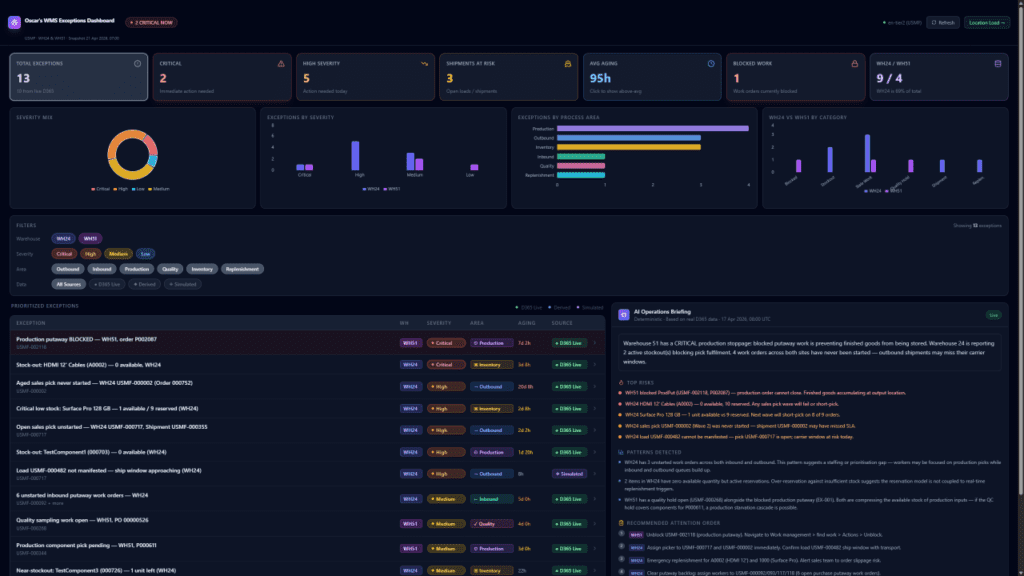
Supply chain complexity is at an all-time high. Warehouse managers and operations teams operating within Microsoft Dynamics 365 Finance and Operations (Supply Chain Management) deal with massive volumes of data, strict fulfillment controls, and constant pressure to do more with less.
Historically, gaining insights into warehouse operations meant manually sifting through static dashboards, hunting for exceptions, and running complex queries just to understand the daily workload. Today, the introduction of AI Agents and Microsoft Copilot is fundamentally changing how we interact with ERP data—shifting the warehouse from a reactive environment to a proactive, “agentic” ecosystem.
Here is a deep dive into how AI agents are unlocking unprecedented warehouse insights within Dynamics 365 F&O and transforming daily operations.
The Shift to “Agentic ERP”
The traditional ERP model relies on human operators to capture transactions, identify patterns, and execute actions based on system data. The new “Agentic ERP” model powered by Copilot flips this script.
Instead of waiting for a warehouse supervisor to notice a bottleneck, AI agents operate in the background and alongside the user. They analyze inbound emails, interpret PDF packing slips, summarize massive data tables, and generate natural-language insights directly within the flow of work. This means AI is no longer just a dashboard tool; it acts as an intelligent assistant that understands context and business logic.
1. Real-Time Workload Insights and Shift Planning
One of the most immediate benefits of AI in the warehouse is the Workload Insights feature. Supply chain teams rarely suffer from a lack of data; they suffer from a lack of synthesized context.
Using Copilot, supervisors can instantly view AI-generated summaries of the current warehouse state. Instead of clicking through multiple screens, an agent can instantly provide a natural-language summary detailing:
-
The exact number of pending pick and receive work lines.
-
The number of active warehouse mobile app sessions.
-
Workforce capacity versus pending warehouse work.
This allows supervisors to optimally allocate their workforce, plan shifts dynamically, and spot potential delays before the shift even begins, rather than discovering problems in real-time on the shop floor.
2. Streamlining Inbound Logistics and Exceptions
Inbound loads are critical to warehouse efficiency, yet creating them is often manual and prone to data entry errors. While some organizations use EDI or API integrations, these require high vendor maturity.
Custom AI agents (built via Copilot Studio) can bypass these heavy integrations. For example, inbound load agents can be deployed to monitor designated email inboxes, extract data from attached vendor packing slips using AI document intelligence, and automatically generate the corresponding inbound loads directly within Dynamics 365 F&O. By the time the truck arrives at the dock, the system is already prepped and waiting, drastically reducing receiving time and dock congestion.
3. Smart Inventory and Location Directives
Managing complex location directives—such as handling negative physical inventory configurations or dynamic stock buffers—requires precision. When a release-to-warehouse operation fails to allocate a pick location, tracing the root cause through wave processing history logs can be incredibly tedious.
AI agents assist by surfacing contextual summaries on item pages and purchase orders. By hovering over items or analyzing inventory status, Copilot can highlight forecast anomalies, trace where-used summaries, and instantly flag order lines that are overdue or lacking confirmed ship dates. By simulating scenarios and analyzing real-time data, AI helps organizations optimize inventory placement, reduce unnecessary double-handling, and navigate complex picking rules with ease.
The Human-AI Synergy
The most successful deployments of AI agents in Dynamics 365 do not attempt to replace human judgment. Instead, they rely on a powerful three-layer model:
-
The ERP captures the transactions and enforces strict business rules.
-
The AI Agent interprets the patterns, summarizes the context, flags exceptions, and prepares draft actions.
-
The Human Operator applies business judgment and approves the final workflow.
Conclusion
Unlocking warehouse insights with AI agents in Dynamics 365 F&O is no longer a futuristic concept—it is a practical, immediate solution to operational bottlenecks. By leveraging Copilot summaries, automated inbound load processing, and intelligent workload insights, organizations can stop paying their teams to be manual data translators. Instead, warehouse staff can focus on what actually matters: maximizing throughput, ensuring quality compliance, and delivering on customer promises.
To get more such useful information, please follow our LinkedIn page and you can also subscribe our you tube page.
YouTube Link: https://www.youtube.com/@bizcentralorbit
LinkedIn Link: https://www.linkedin.com/company/bizcentralorbit/posts/?feedView=all
If you want to book a 1-to-1 live session with any of our expert consultants then click the link: https://bizcentralorbit.com/#One-to
If you want more updates and daily Blogs like “Can We Delete Posted Documents in Business Central?” click the link: https://bizcentralorbit.com/can-we-delete-posted-documents-in-business-central/
If you want more Demo and Tutorial videos like “How to create Special Order in Business Central” on Youtube click the link: https://www.youtube.com/watch?v=qFj_ECsOVrY
Raise a support ticket instantly by clicking the link: https://bizcentralorbit.com/contact-us/
Want to analyze any requirement and collaborate? Let’s work together to deliver the best solution! Please submit the details here: https://bizcentralorbit.com/bc-consultants/
Well-written and properly structured—easy to navigate and understand.
This is a strong practical guide for Business Central users.
The examples shared here make implementation easier to visualize.
Useful insights shared here—especially for implementation teams.
I found the practical scenarios mentioned here especially valuable.
The steps are explained in a very logical sequence.
Gamepk? Sounds like a portal for all things gaming! Time to see what gems I can find here and level up my gameplay. gamepk
Looking for a new slot to try. Saw slotspkgame, looks promising. Anyone have any thoughts before I deposit? Good luck at slotspkgame
Anyone else betting on v788bet? I think this is the best place! Is v788bet legit: v788bet
This is my new favorite spot for some weekend fun. The odds are fair and the atmosphere is great. Love bdbet5777!
The login process is so fast and I never have issues accessing my account. Really impressed with the service at 6jililogin.
The graphics and sound on this site make it feel like a real casino. I had a huge win last night and the support team was very helpful. Love phokadacasino!
Really impressed with the variety of games available here. It feels very secure and the customer support team is actually helpful. I’m having a great time so far. Highly recommend bdtk999win
Really impressed with the user interface. Everything is so easy to find and the loading speed is top notch. Love phaaajili7!
Really impressed with the layout and the variety of options here. It is easy to navigate and the rewards are great. plataformaboxwin is a solid choice for any player.
I love how I can bet anytime and anywhere. The 24/7 availability is perfect for my schedule and the odds are quite competitive. kr247bet
Really liking the rewards system on this app. It keeps things exciting and the prizes are actually attainable. bdbb444app is my new favorite.
The jackpots here are insane! I’ve tried many sites but the winning streak I had at mustang303slot was something else. Totally worth a visit.
The graphics are amazing and the gameplay is so addictive. I’ve spent hours on this and it’s never boring. Definitely give jilikkkapp a try.
Everything from the deposit to the withdrawal was effortless. Big thanks to vnc168a for the professional service.
I really appreciate how easy the login process is here. No complicated steps just straightforward gaming. kkslot777login is definitely my new favorite.
I’ve been playing here for a few weeks now and the payouts are surprisingly fast. Definitely one of the smoother experiences I’ve had lately. Check out br333bet8 if you want a reliable spot.
Great options for cash-ins and withdrawals. It is very convenient for local players and the support team is helpful. Visit phnustargcash
A very honest platform with fair odds. It is hard to find sites this trustworthy these days. I trust zz88bcom
Finally a site that actually pays out without a million questions. The experience has been seamless from start to finish. Visit pkok777bet