
Business Central AL Development Beginner's Guide — Build Your First Microsoft BC Extension (2026)
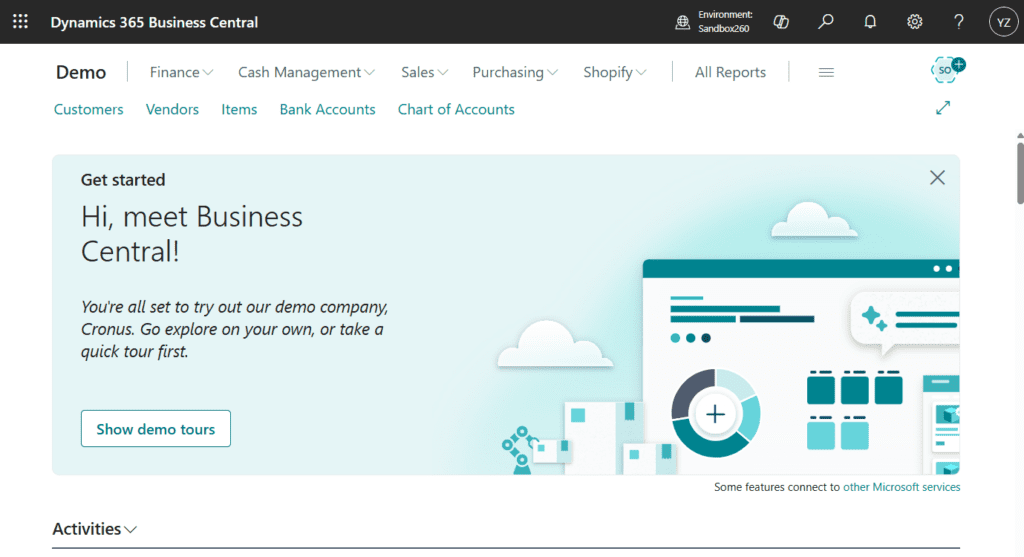
If you’re starting your journey into Microsoft Dynamics 365 Business Central development, AL Language is the gateway. AL (Application Language) is Microsoft’s proprietary programming language designed specifically for extending Business Central — and it’s what every BC developer must master.
This complete beginner’s guide walks you through everything you need to start building your first Business Central extension in 2026: what AL is, how to set up your development environment, the core AL object types, hands-on code examples, and how to deploy your first extension to a real BC tenant.
By the end of this guide, you’ll have a working “Hello World” extension running in your own Business Central sandbox — and you’ll understand the foundations to keep building.
What is AL Language?
AL (Application Language) is Microsoft’s domain-specific programming language for developing extensions and customizations on top of Microsoft Dynamics 365 Business Central. It replaced the older C/AL language when Microsoft transitioned from NAV (Navision) to modern cloud-first Business Central in 2018.
AL is purpose-built for business application development. Unlike general-purpose languages like JavaScript or Python, AL has native concepts for:
- Database tables (with built-in field types like Code, Decimal, Boolean)
- User interface pages (lists, cards, role centers)
- Business logic (codeunits, triggers, events)
- Reports (both classic and Word/Excel layouts)
- Web services (APIs exposed automatically from your objects)
- Permissions and security (built-in role-based access)
If you’ve worked with SQL + a business framework like Salesforce Apex or SAP ABAP, AL will feel familiar — it’s a strongly-typed, object-oriented language with the ERP system baked in at the language level.
Why Learn AL in 2026?
The Microsoft Dynamics 365 Business Central ecosystem is growing rapidly, and AL developers are in high demand worldwide:
✅ High earning potential — AL developers in India earn ₹6-25 lakh/year depending on experience. Globally, $70,000-$150,000/year is typical.
✅ Cloud-first future — Business Central is Microsoft’s #1 growth ERP. Every new BC tenant needs AL extensions for customizations.
✅ Lower entry barrier than enterprise platforms — Compared to SAP ABAP or Oracle PeopleCode, AL has a friendlier learning curve and free development tools.
✅ AppSource opportunity — Build extensions, publish to Microsoft AppSource, earn recurring revenue from customers worldwide.
✅ Career flexibility — Work as an in-house BC developer, partner consultant, or independent contractor. The MB-820 Developer Associate certification credentials your skills.
✅ Adjacent to Copilot AI — As Microsoft embeds Copilot deeper into BC, AL developers who understand AI integration patterns are uniquely valuable.
Prerequisites Before You Start
To follow this guide, you should have:
- A Windows, Mac, or Linux computer with internet access
- Basic programming familiarity (you’ve written code in any language before — variables, loops, functions)
- A free Microsoft account (any @outlook.com, @hotmail.com, or even @gmail.com works)
- Optional but recommended: Basic SQL knowledge (understanding tables, rows, columns)
You do NOT need:
- ❌ A paid Business Central license (we’ll use a free 30-day trial sandbox)
- ❌ Prior Microsoft Dynamics experience
- ❌ Advanced math or computer science background
Setting Up Your AL Development Environment
The AL development setup is free and takes about 20-30 minutes. Here’s what you need to install:
Step 1: Install Visual Studio Code
VS Code is Microsoft’s free, lightweight code editor — and it’s the official IDE for AL development.
- Visit code.visualstudio.com
- Download the version for your operating system
- Install with default settings
Step 2: Install the AL Language Extension
This is the magic that turns VS Code into a Business Central development powerhouse.
- Open VS Code
- Click the Extensions icon in the left sidebar (or press
Ctrl+Shift+X) - Search for: “AL Language”
- Look for the extension by Microsoft (verified blue checkmark)
- Click Install
After installation, the AL Language extension provides:
- AL syntax highlighting
- IntelliSense (auto-completion as you type)
- Built-in compiler and error checking
- Direct deployment to Business Central sandboxes
- Object Designer integration
- Symbol downloader (gets all standard BC objects for reference)
Step 3: Create a Free Business Central Sandbox
You need a BC environment to deploy your AL extensions to. Microsoft provides free 30-day trial sandboxes.
- Visit trials.dynamics.com
- Select “Dynamics 365 Business Central”
- Sign in with your Microsoft account
- Select region (choose your country for accurate pricing/tax demo data)
- Wait 5-10 minutes for the sandbox to provision
- You’ll receive an email with your BC URL (typically
https://businesscentral.dynamics.com/[your-tenant]/Sandbox)
Step 4: Create Your First AL Project
Now we’ll create the project folder structure:
- Open VS Code
- Press
Ctrl+Shift+Pto open the Command Palette - Type: “AL: Go!”
- Select “AL: Go!” from the dropdown
- Choose a folder location for your project (create a new empty folder)
- Select “Microsoft cloud sandbox” when prompted
- VS Code creates the project structure with default files
HelloWorld/
├── .vscode/
│ └── launch.json ← Connection settings to your BC sandbox
├── app.json ← App manifest (id, name, publisher, version)
├── HelloWorld.al ← Your first AL object (a page extension)
└── .gitignore
Step 5: Connect to Your Sandbox
Open launch.json and update the tenant, environmentName, and startupObjectId fields based on your sandbox details (these come from your BC trial URL).
{
    "version": "0.2.0",
    "configurations": [
        {
            "name": "Sandbox: BC Trial",
            "request": "launch",
            "type": "al",
            "environmentType": "Sandbox",
            "environmentName": "Sandbox",
            "tenant": "common",
            "startupObjectId": 22,
            "startupObjectType": "Page",
            "schemaUpdateMode": "ForceSync",
            "breakOnError": true
        }
    ]
}
Understanding AL Object Types
Before writing code, understand the core building blocks. AL has several object types, but as a beginner you’ll primarily work with these:
1. Tables — Store Your Data
Tables in AL are like SQL tables but with built-in field validation, triggers, and UI integration.
Example use case: You want to track “Service Requests” from customers — a custom table that doesn’t exist in standard BC.
2. Pages — Display the UI
Pages are how users interact with table data. There are several page types:
- List pages — Show records in a table format (like a spreadsheet)
- Card pages — Show one record at a time (like a contact card)
- Role centers — Custom dashboards for specific user roles
- API pages — Expose your tables as REST APIs automatically
3. Codeunits — Business Logic
Codeunits contain procedures (functions/methods) for your business logic. Reusable, testable, and can be triggered by events.
Example use case: A codeunit that calculates a customer discount based on order history.
4. Reports — Printed/Exported Output
Reports generate printable or exportable documents (invoices, customer statements, inventory reports).
5. Extensions to Existing Objects
You’ll often need to add fields, actions, or behaviors to standard BC objects (like the Customer table or Sales Order page). AL provides table extensions and page extensions for this.
Code Example 1: Your First Custom Table
Let’s create a simple “Service Request” table. Replace the contents of HelloWorld.al with:
table 50100 "Service Request"
{
    Caption = 'Service Request';
    DataClassification = CustomerContent;

    fields
    {
        field(1; "Request No."; Code[20])
        {
            Caption = 'Request No.';
            DataClassification = CustomerContent;
        }
        field(2; "Customer No."; Code[20])
        {
            Caption = 'Customer No.';
            DataClassification = CustomerContent;
            TableRelation = Customer."No.";
        }
        field(3; "Description"; Text[100])
        {
            Caption = 'Description';
            DataClassification = CustomerContent;
        }
        field(4; "Request Date"; Date)
        {
            Caption = 'Request Date';
            DataClassification = CustomerContent;
        }
        field(5; "Status"; Enum "Service Request Status")
        {
            Caption = 'Status';
            DataClassification = CustomerContent;
        }
        field(6; "Priority"; Option)
        {
            Caption = 'Priority';
            OptionMembers = Low,Medium,High,Critical;
            DataClassification = CustomerContent;
        }
    }

    keys
    {
        key(PK; "Request No.")
        {
            Clustered = true;
        }
    }
}

enum 50100 "Service Request Status"
{
    Extensible = true;

    value(0; Open) { Caption = 'Open'; }
    value(1; "In Progress") { Caption = 'In Progress'; }
    value(2; Resolved) { Caption = 'Resolved'; }
    value(3; Closed) { Caption = 'Closed'; }
}
Key concepts demonstrated:
table 50100— Object ID in the per-tenant extension range (50000-99999)Caption— User-visible labelDataClassification— Required for GDPR complianceCode[20]— Code field type (max 20 chars, alphanumeric)TableRelation— Links to Customer table for referential integrityEnum— Type-safe enumeration (modern replacement for Option)keys— Primary key definition
Code Example 2: Display Data with a List Page
Now let’s create a page to display service requests. Add this AL code to a new file ServiceRequestList.al:
page 50100 "Service Request List"
{
    Caption = 'Service Requests';
    PageType = List;
    SourceTable = "Service Request";
    UsageCategory = Lists;
    ApplicationArea = All;
    CardPageId = "Service Request Card";

    layout
    {
        area(Content)
        {
            repeater(Group)
            {
                field("Request No."; Rec."Request No.")
                {
                    ApplicationArea = All;
                }
                field("Customer No."; Rec."Customer No.")
                {
                    ApplicationArea = All;
                }
                field("Description"; Rec."Description")
                {
                    ApplicationArea = All;
                }
                field("Request Date"; Rec."Request Date")
                {
                    ApplicationArea = All;
                }
                field("Status"; Rec."Status")
                {
                    ApplicationArea = All;
                    StyleExpr = StatusStyle;
                }
                field("Priority"; Rec."Priority")
                {
                    ApplicationArea = All;
                }
            }
        }
    }

    actions
    {
        area(Processing)
        {
            action(MarkResolved)
            {
                Caption = 'Mark as Resolved';
                ApplicationArea = All;
                Image = Approve;

                trigger OnAction()
                begin
                    Rec.Status := Rec.Status::Resolved;
                    Rec.Modify(true);
                end;
            }
        }
    }

    var
        StatusStyle: Text;

    trigger OnAfterGetRecord()
    begin
        case Rec.Status of
            Rec.Status::Open: StatusStyle := 'Attention';
            Rec.Status::"In Progress": StatusStyle := 'Ambiguous';
            Rec.Status::Resolved: StatusStyle := 'Favorable';
            Rec.Status::Closed: StatusStyle := 'Subordinate';
        end;
    end;
}
Key concepts demonstrated:
PageType = List— Page renders as a list/gridSourceTable— Connects page to the underlying tableUsageCategory = Lists— Makes page searchable in BC Tell Merepeater— Renders the table as repeating rowsStyleExpr— Color-code rows based on statusactions— Add buttons to the page ribbontrigger OnAction— Code that runs when button clickedtrigger OnAfterGetRecord— Runs after each record loaded
Code Example 3: Add Business Logic with a Codeunit
Codeunits contain reusable business logic. Let’s create one to auto-assign request numbers:
codeunit 50100 "Service Request Mgt."
{
    procedure AssignRequestNumber(var ServiceRequest: Record "Service Request")
    var
        LastRequest: Record "Service Request";
        NextNo: Integer;
    begin
        if ServiceRequest."Request No." <> '' then
            exit;

        LastRequest.Reset();
        if LastRequest.FindLast() then
            NextNo := GetNumericPart(LastRequest."Request No.") + 1
        else
            NextNo := 1;

        ServiceRequest."Request No." := 'SR-' + Format(NextNo, 6, '<Integer,6><Filler Character,0>');
    end;

    local procedure GetNumericPart(RequestNo: Code[20]): Integer
    var
        NumericString: Text;
        i: Integer;
    begin
        for i := 1 to StrLen(RequestNo) do
            if RequestNo[i] in ['0'..'9'] then
                NumericString += RequestNo[i];

        if NumericString = '' then
            exit(0);

        exit(Evaluate(NumericString));
    end;

    [EventSubscriber(ObjectType::Table, Database::"Service Request", 'OnBeforeInsertEvent', '', false, false)]
    local procedure OnBeforeInsertServiceRequest(var Rec: Record "Service Request")
    begin
        AssignRequestNumber(Rec);

        if Rec."Request Date" = 0D then
            Rec."Request Date" := Today();
    end;
}
Key concepts demonstrated:
procedure— Public method callable from other objectslocal procedure— Helper method only callable within this codeunitvarkeyword — Pass parameter by referenceEventSubscriber— Subscribe to BC’s event system (modern AL pattern)OnBeforeInsertEvent— Runs automatically when a new Service Request is inserted
AL Language Essentials
These language fundamentals appear in nearly every AL project:
Variables and Data Types
var
    CustomerNo: Code[20];
    Amount: Decimal;
    IsActive: Boolean;
    OrderDate: Date;
    OrderTime: Time;
    Description: Text[100];
    Counter: Integer;
Conditionals
if Amount > 1000 then
    ApplyDiscount()
else
    StandardPricing();

case Status of
    Status::Open: ProcessOpen();
    Status::Closed: ProcessClosed();
    else
        DefaultAction();
end;
Loops
// For loop
for i := 1 to 10 do
    Message('Iteration %1', i);

// Foreach record loop
if Customer.FindSet() then
    repeat
        ProcessCustomer(Customer);
    until Customer.Next() = 0;

// While loop
while Counter < 100 do
    Counter += 1;
Working with Records
// Find single record
Customer.Get('10000');

// Filter and iterate
Customer.SetRange("Country/Region Code", 'IN');
Customer.SetFilter("Sales (LCY)", '>%1', 100000);
if Customer.FindSet() then
    repeat
        // Do something with each filtered customer
    until Customer.Next() = 0;

// Insert new record
NewCustomer.Init();
NewCustomer."No." := '50000';
NewCustomer.Name := 'BizCentralOrbit Demo';
NewCustomer.Insert(true);
Building & Deploying Your Extension
Time to see it run.
Step 1: Compile and Deploy
- Save all your AL files (
Ctrl+S) - Press
F5(or use Command Palette → “AL: Publish”) - VS Code will:
- Compile your code
- Connect to your BC sandbox
- Deploy the extension
- Open Business Central in your browser
Step 2: See Your Page in BC
- In Business Central, click the search icon (magnifying glass top-right)
- Type: “Service Requests”
- Click the result — you should see your custom List page open
Step 3: Add a Test Record
- Click + New on the list page
- Fill in Customer No., Description, and Status
- Save (Esc or Ctrl+S)
- Notice your codeunit auto-assigned a Request No. like
SR-000001
Your first AL extension is live in Business Central.
Common Beginner Mistakes (And How to Avoid Them)
Mistake #1: Using Object IDs Outside the Per-Tenant Range
Problem: Using IDs like 1 or 100000 causes conflicts with Microsoft objects.
Fix: Always use object IDs in the 50000-99999 range for per-tenant extensions.
Mistake #2: Forgetting DataClassification
Problem: Compilation warnings, GDPR non-compliance.
Fix: Every field must have DataClassification = CustomerContent; (or appropriate value).
Mistake #3: Hardcoded Captions Without Multi-Language Support
Problem: Your extension only works in English.
Fix: Use Caption properties with comment for translators, and create .xlf translation files.
Mistake #4: Direct Database Modifications in Loops
Problem: Slow performance, potential deadlocks.
Fix: Use ModifyAll, DeleteAll bulk methods when possible. Wrap loops in transactions.
Mistake #5: Not Using Events
Problem: Modifying base Microsoft objects directly (forbidden in cloud).
Fix: Subscribe to events using EventSubscriber instead of modifying standard objects.
Mistake #6: Ignoring Permissions
Problem: Users get “permission denied” errors.
Fix: Create a permission set XML for your extension covering all custom objects.
Next Steps for Your AL Journey
You’ve built your first extension. Here’s the roadmap to becoming a proficient AL developer:
Phase 1: Foundations (Weeks 1-4)
- This guide (you’re here!)
- Watch the BizCentralOrbit Technical Series — 11+ videos covering AL fundamentals
- Read Microsoft’s official AL Language documentation
- Build 3-5 small extensions on your own
Phase 2: Intermediate Patterns (Months 2-3)
- Master event subscribers and the BC event model
- Learn table extensions and page extensions deeply
- Build API pages and integrate with external systems
- Understand the BC permission system
Phase 3: Advanced Development (Months 4-6)
- Performance optimization techniques
- AppSource publishing requirements
- DevOps for AL (source control, CI/CD)
- Pass the MB-820 Microsoft Certified: Dynamics 365 Business Central Developer Associate exam
Phase 4: Specialization
- Choose a vertical (manufacturing, retail, services)
- Build deep expertise in 1-2 modules (Finance, Inventory, etc.)
- Contribute to AL open-source projects
- Consider becoming a Microsoft Solutions Partner
Get Help on Your AL Journey
Learning AL development is a marathon, not a sprint. Here are resources to accelerate your journey:
Free Resources
- BizCentralOrbit Technical Series Free YouTube tutorials on AL development
- BizCentralOrbit Blog Articles on BC, AL, MB-800/820 certification, BC vs SAP comparisons
- Microsoft Learn AL Path Official Microsoft modules
1-to-1 Mentorship
Want personalized guidance from experienced AL developers? BizCentralOrbit’s marketplace includes 15+ vetted AL developers offering 1-to-1 mentor sessions covering:
- Code reviews of your AL projects
- Architecture guidance for your first AppSource extension
- Career coaching for transitioning into BC development
- MB-820 certification exam preparation
Browse BC technical consultants and developers
Certification Prep
The MB-820 Microsoft Certified: Dynamics 365 Business Central Developer Associate exam is the official credential for AL developers. BizCentralOrbit offers structured prep cohorts. Learn about MB-820 certification
Frequently Asked Questions
What is AL Language in Business Central?
AL (Application Language) is Microsoft’s proprietary programming language designed specifically for developing extensions and customizations for Microsoft Dynamics 365 Business Central. It replaced the older C/AL language in 2018 when Microsoft moved Business Central to a modern cloud-first architecture. AL is purpose-built for business application development with native concepts for tables, pages, codeunits, reports, and APIs.
How long does it take to learn AL development?
Most developers with prior programming experience can write basic AL extensions within 2-4 weeks. Reaching intermediate proficiency (independent extension development) typically takes 3-6 months of consistent practice. Becoming a senior AL developer with AppSource publication experience takes 12-24 months. The MB-820 certification exam can typically be passed after 4-6 months of focused study.
Do I need to know C/AL before learning AL?
No. AL is the modern replacement for C/AL, and you can learn AL directly without any C/AL background. In fact, learning AL first is recommended for new developers since C/AL is being phased out and AL is the only language supported for cloud Business Central extensions. If you’re maintaining legacy NAV 2016-2018 code, you may encounter C/AL, but for all new development AL is the standard.
What tools do I need for AL development?
You need: (1) Visual Studio Code (free), (2) the AL Language extension for VS Code (free, by Microsoft), (3) access to a Business Central sandbox environment (free 30-day trial via trials.dynamics.com), and (4) a Microsoft account. That’s the complete free toolchain — no paid licenses required for development. For production deployment, you’ll need a paid BC tenant.
What’s the difference between AL and JavaScript or C#?
AL is a domain-specific language for business applications — it has built-in concepts for database tables, UI pages, reports, and ERP-specific logic. JavaScript and C# are general-purpose languages. While JavaScript runs in browsers and Node.js, and C# runs on .NET, AL only runs in the Business Central runtime. AL has stricter typing than JavaScript and is more concise than C# for ERP scenarios. If you know C#, AL will feel very familiar — similar object-oriented syntax with stronger typing.
Can I make money with AL development?
Yes significantly. AL developers earn ₹6-25 lakh/year in India (₹50,000-2,00,000/month) depending on experience. Globally, salaries range from $70,000-$150,000/year. Independent AL developers can earn additional income through: AppSource extensions with recurring subscription revenue, freelance customization projects, BC consultancy contracts, and training/mentorship. The combination of high demand and limited supply makes AL development a particularly lucrative niche within Microsoft Dynamics consulting.
What is the MB-820 certification?
MB-820 is the Microsoft Certified: Dynamics 365 Business Central Developer Associate exam the official credential for AL developers. It covers AL language fundamentals, extension development, integrations, performance optimization, testing, and deployment. The exam costs $165 USD and has roughly a 50-60% pass rate. Most candidates pass after 4-6 months of focused preparation. BizCentralOrbit offers structured MB-820 prep cohorts with 1-to-1 mentor support.
Conclusion
You’ve just built your first Microsoft Business Central extension in AL. That’s a real milestone most aspiring BC developers stall on environment setup. You’re now past that.
Here’s what to do next:
- Build 3 more small extensions to cement the basics (custom tables, page extensions, simple business logic)
- Watch the BizCentralOrbit Technical Series to see real-world AL patterns
- Plan your MB-820 certification path give yourself 4-6 months
- Connect with other AL developers join the BC community
The BC ecosystem in India is growing fast, and skilled AL developers are needed everywhere. The work you put in now compounds for years.
Need personalized help? Hire a BC technical consultant from BizCentralOrbit our marketplace has 15+ vetted AL developers ready for code reviews, mentor sessions, or project work.
Stuck on a complex AL extension or planning your first AppSource publication? Hire a vetted Business Central AL developer for code reviews or project work — BizCentralOrbit’s marketplace has 15+ technical consultants specializing in AL.
To get more such useful information, please follow our LinkedIn page and you can also subscribe our you tube page.
YouTube Link: https://www.youtube.com/@bizcentralorbit
LinkedIn Link: https://www.linkedin.com/company/bizcentralorbit/posts/?feedView=all
If you want more updates and daily Blogs like “Can We Delete Posted Documents in Business Central?” click the link: https://bizcentralorbit.com/can-we-delete-posted-documents-in-business-central/
If you want more Demo and Tutorial videos like “Environment Transfers in Business Central” on Youtube click the link: https://youtu.be/K0wq7UPivTs?si=ouxFMamq8Pl2K9S4
Raise a support ticket instantly by clicking the link: https://bizcentralorbit.com/contact-us/
Want to analyze any requirement and collaborate? Let’s work together to deliver the best solution! Please submit the details here: https://bizcentralorbit.com/bc-consultants/
Quick installation and the app is very light on memory. Everything is optimized for a great experience. Get it now at luky888download.
The registration process was a breeze. I love how the graphics look on my phone. 98jiliapp is definitely my new go-to for some quick fun.