
What is Microsoft Dynamics 365 Business Central? A Beginner's Guide for 2026
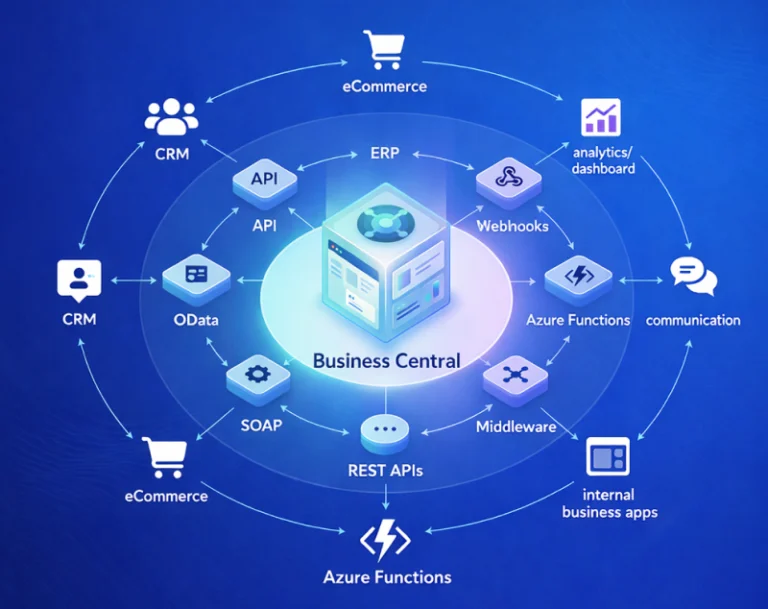
Microsoft Dynamics 365 Business Central (often shortened to “BC” or just “Business Central”) is one of the most-searched ERP terms of 2026 — and for good reason. Whether you’re a business owner researching ERP options, a fresh graduate exploring career paths, or an IT decision-maker comparing platforms, this guide gives you everything you need to know about Business Central in one place. We’ll cover what it is, what it does, who uses it, what it costs, and how to get started — all in plain language with no jargon.
What Is Microsoft Dynamics 365 Business Central?
Microsoft Dynamics 365 Business Central is a cloud-based Enterprise Resource Planning (ERP) platform built by Microsoft specifically for small and mid-sized businesses (typically 5 to 300 employees). Think of it as a single connected system that runs your finance, sales, purchasing, inventory, manufacturing, and customer service operations — replacing the patchwork of spreadsheets, accounting software, and disconnected tools that most growing businesses outgrow by year three.
Business Central is part of Microsoft’s broader Dynamics 365 family alongside Sales, Customer Service, and Finance & Operations. But Business Central is the one designed for SMBs that want enterprise-grade capability without enterprise-grade complexity. It runs natively on the cloud (Microsoft Azure), integrates deeply with Microsoft 365 (Outlook, Teams, Excel), and includes AI features through Copilot in 2026.
A Brief History — From Navision to Modern Business Central
Business Central didn’t appear out of nowhere — it has 40 years of evolution behind it. It started in Denmark in 1984 as “Navision,” a Danish accounting software that grew rapidly across Europe. Microsoft acquired Navision in 2002 and rebranded it as Microsoft Dynamics NAV. For the next 16 years, NAV was Microsoft’s flagship SMB ERP. In 2018, Microsoft launched Business Central as the cloud-native successor to NAV, bringing it onto Azure and modernizing the user interface. Today’s Business Central is the most-adopted Microsoft ERP for small and mid-sized businesses worldwide, with hundreds of thousands of customers across 150+ countries.
The Core Modules of Business Central
Business Central is modular — meaning different functional areas plug into each other but can be configured based on what your business actually needs. Here are the core modules every BC implementation typically uses.
Finance is the heart of Business Central. It includes General Ledger, Accounts Payable, Accounts Receivable, Bank reconciliation, Fixed Assets, and Cash Flow forecasting. BC handles multi-currency, multi-company consolidation, and country-specific tax compliance (including Indian GST, US sales tax, and European VAT).
Sales covers the customer side — from initial quotes through orders, invoices, shipments, and returns. It connects to inventory automatically so you always know what you can promise customers, and it tracks customer history for repeat business and credit decisions.
Purchase mirrors Sales but on the vendor side. You manage purchase orders, vendor invoices, receiving, and payments. BC handles approval workflows, three-way matching (PO + receipt + invoice), and vendor performance tracking.
Inventory ties Sales and Purchase together. Items, locations, lot tracking, serial numbers, costing methods (FIFO, LIFO, Average, Standard), and warehouse management are all built in.
Manufacturing is for businesses that produce goods. Bills of materials (BOMs), production routings, work centers, capacity planning, and shop floor execution are included. For more complex manufacturing, ISV add-ons extend BC’s capability.
Reporting and Analytics are powered by Power BI integration. BC exposes data to Power BI for dashboards, and includes built-in financial reports plus customizable ad-hoc analysis through “Analysis Mode” in any list view.
How Much Does Business Central Cost?
Business Central pricing in 2026 has three license types. Essentials covers most SMBs — Finance, Sales, Purchase, Inventory, Project Accounting — at roughly $70 USD per user per month (≈ ₹5,800). Premium adds Manufacturing and Service Management at approximately $100 USD per user per month (≈ ₹8,300). Team Member is for users who only consume data (read access + light data entry) at around $8 USD per user per month (≈ ₹680).
Full implementation costs vary by company size. Small business deployments (5-25 users) typically cost ₹4-15 lakh in year one (licensing + implementation). Mid-market (25-100 users) ranges from ₹15-40 lakh. Enterprise deployments (100+ users) can exceed ₹40 lakh. For detailed cost breakdowns including hidden costs and Indian market pricing, see our complete guide to Business Central consulting cost in India 2026.
Who Uses Business Central?
The typical Business Central customer is a small or mid-sized business that has outgrown entry-level accounting software like QuickBooks, Tally, or Zoho Books. Common industries include distribution and wholesale, light manufacturing, professional services, retail (with POS extensions), nonprofits, and project-based businesses.
Geographically, Business Central is strongest in North America, Europe, and increasingly India and Southeast Asia. Microsoft has shipped India localization with full GST compliance, making BC a natural fit for Indian SMBs that need to scale beyond Tally. Companies often migrate to BC when they hit 15-25 employees, multi-entity operations, or international expansion.
Notable customer segments include manufacturing companies needing BOMs and production tracking, distributors managing multi-location inventory, service businesses tracking project profitability, e-commerce retailers integrating Shopify or WooCommerce with their ERP, and consulting firms tracking time and project costs.
Business Central vs Other ERPs
The natural question when researching Business Central is: how does it compare to alternatives? Against SAP Business One, BC wins on cloud-native architecture, modern UI, Microsoft 365 integration, and total cost of ownership for most SMBs. SAP B1 has slight edges in manufacturing complexity and certain geographies. Against Tally or Zoho Books, BC is a true ERP versus accounting software — choose BC when you need inventory, manufacturing, or multi-entity scalability beyond what Tally and Zoho can offer. Against NetSuite, BC offers similar capability at lower TCO for businesses already in the Microsoft ecosystem; NetSuite has stronger international subsidiaries and consolidations. For a comprehensive side-by-side analysis, read our complete Business Central vs SAP Business One comparison.
The 5-Phase Implementation Process
Going live on Business Central typically follows five phases. Discovery captures business requirements and current process pain points. Solution Design maps requirements to BC modules and identifies gaps or integrations needed. Configuration involves setting up your Chart of Accounts, items, customers, vendors, and dimensions. Testing and Training covers user acceptance testing plus training your team on the new system. Go-Live and Hypercare handles the cutover and 2-6 weeks of intensive post-launch support. Total timeline ranges from 6 weeks (small business with RapidStart) to 14 months (enterprise with heavy customization). For a complete deep-dive on the implementation process, timelines by company size, and common mistakes to avoid, read our Business Central Implementation Guide.
How to Get Started with Business Central
There are several entry points depending on your goal. If you want to evaluate it as a buyer, start with a free 30-day trial at trials.dynamics.com — you get a fully functional sandbox to explore the modules. If you want to learn BC for career development, our complete guide on how to learn Microsoft Business Central walks through free resources, paid courses, and 1-to-1 mentor sessions. If you want certification, the MB-800 (Functional Consultant Associate) is Microsoft’s official BC certification — our MB-800 preparation guide covers the 8-week study plan.
If you’re a business ready to implement BC, you have three partner types to choose from: Microsoft Solutions Partners (large certified firms — best for enterprise), Independent Consultants (individual experts — best for small business and mentoring), and Consultancy Companies (small specialized teams — flexible middle ground). BizCentralOrbit lets you find and compare all three types in one platform.
The AI Era — Copilot in Business Central
The biggest change in Business Central 2026 is Microsoft Copilot integration. Copilot is now embedded across BC — bank reconciliation Copilot reduces monthly close time by 70%, sales line suggestions increase average order value by 8-15%, marketing text generation creates SEO-friendly product descriptions automatically, document capture AI extracts data from vendor invoices and receipts, and Analysis Assist lets you ask natural-language questions about any list in BC. AI features are included in standard Essentials and Premium licenses for 2026 — no additional Copilot license required for core features. For the complete breakdown of every AI feature in BC 2026, read our AI features in Business Central guide.
Where to Learn More
For official Microsoft documentation and free training modules, visit Microsoft Learn at learn.microsoft.com/dynamics365/business-central. The official Microsoft product page at microsoft.com/dynamics-365/products/business-central has detailed feature comparisons and licensing information. Community discussions happen on Microsoft Dynamics 365 Community forums and Reddit’s r/Dynamics365 subreddit.
Frequently Asked Questions
-
Is Microsoft Business Central a cloud or on-premise system?
Business Central is primarily a cloud product (Business Central Online) hosted on Microsoft Azure. There is an on-premise option (Business Central On-premises) but Microsoft prioritizes the cloud version with Copilot AI features, automatic updates, and lower TCO. We recommend the cloud version for all new implementations.
-
Is Business Central the same as Microsoft Dynamics NAV?
Business Central is the cloud-native successor to Dynamics NAV. NAV is being phased out — Microsoft ended mainstream support for NAV in 2023. If you’re on NAV, an upgrade to Business Central is strongly recommended. The data and customizations can be migrated through structured upgrade paths.
-
Can a 10-person company afford Business Central?
Yes. A 10-user small business deployment typically costs ₹4-8 lakh in year one (licensing plus 8-10 week implementation). BC scales from 5 users up to 300+ users on the same platform, so you don’t have to re-platform as you grow. Many SMBs find BC more cost-effective than maintaining Tally plus spreadsheets plus standalone CRM.
-
How long does it take to implement Business Central?
Implementation timelines vary by company size and complexity. Small business: 6-12 weeks. Mid-market: 4-7 months. Enterprise: 7-14 months. RapidStart configuration packages can compress small-business deployments to 4-6 weeks.
-
What’s the difference between Business Central Essentials and Premium?
Essentials covers Finance, Sales, Purchase, Inventory, and Project Accounting — sufficient for most SMBs. Premium adds Manufacturing (BOMs, production orders, capacity planning) and Service Management (service orders, contracts, dispatching). Choose Premium only if you actually need manufacturing or field service capability.
-
What does Dynamics 365 Business Central do?
Microsoft Dynamics 365 Business Central manages your entire business through one connected system – finance and accounting, sales and customer service, purchasing, inventory, manufacturing, and reporting. It replaces the patchwork of spreadsheets, separate accounting software, and disconnected tools that most growing SMBs accumulate as they scale beyond 15-25 employees. Business Central handles multi-currency transactions, multi-company consolidation, and country-specific tax compliance including Indian GST.
-
Is Dynamics 365 Business Central a CRM or ERP?
Business Central is an ERP (Enterprise Resource Planning) system, not a CRM. ERP manages internal operations like finance, inventory, manufacturing, and supply chain. CRM (Customer Relationship Management) manages external customer interactions like sales pipelines and marketing. For dedicated CRM features, Microsoft offers Dynamics 365 Sales and Dynamics 365 Customer Service as separate products. Business Central does include basic sales and customer management for SMBs, but it’s primarily an ERP platform.
-
What is the difference between Dynamics 365 and Business Central?
Dynamics 365 is Microsoft’s broader cloud business applications platform that includes multiple products. Business Central is one specific product within Dynamics 365 – the ERP designed for small and mid-sized businesses with 5-300 users. Other Dynamics 365 products include Sales (CRM), Customer Service, Finance and Operations (enterprise ERP for 300+ users), Marketing, and Field Service. So Business Central is a Dynamics 365 product, not a separate competitor to it.
-
What is Microsoft Dynamics 365 used for?
Microsoft Dynamics 365 is used for running business operations across multiple categories: ERP (Business Central for SMBs, Finance and Operations for enterprises), CRM (Sales, Customer Service), marketing, HR, and field service. Companies typically use Dynamics 365 to replace older systems like Tally, QuickBooks, SAP, or NetSuite. For SMBs with 5-300 users, the most common Dynamics 365 product is Business Central.
Ready to Explore Business Central?
Whether you’re researching as a buyer, learner, or career aspirant — BizCentralOrbit connects you with the right Business Central expert. Book a free 15-minute consultation with one of our 63+ vetted BC consultants worldwide to discuss your specific needs.
Still wondering whether Business Central is right for your business? Book a 1-to-1 session with a vetted BC functional consultant — get personalized guidance before you commit to anything.
To get more such useful information, please follow our LinkedIn page and you can also subscribe our you tube page.
YouTube Link: https://www.youtube.com/@bizcentralorbit
LinkedIn Link: https://www.linkedin.com/company/bizcentralorbit/posts/?feedView=all
If you want more updates and daily Blogs like “Can We Delete Posted Documents in Business Central?” click the link: https://bizcentralorbit.com/can-we-delete-posted-documents-in-business-central/
If you want more Demo and Tutorial videos like “Environment Transfers in Business Central” on Youtube click the link: https://youtu.be/K0wq7UPivTs?si=ouxFMamq8Pl2K9S4
Raise a support ticket instantly by clicking the link: https://bizcentralorbit.com/contact-us/
Want to analyze any requirement and collaborate? Let’s work together to deliver the best solution! Please submit the details here: https://bizcentralorbit.com/bc-consultants/
Excited to see how Security Copilot evolves from here
Installing the app made a huge difference. It’s much more convenient to play on the go. Grab the app at bat999gamedownloadapk.
The bonuses here are actually usable and not just bait. Had a great run last night and the withdrawal was processed surprisingly quickly. Big thanks to vnxt88
Best slot games in the Philippines for sure. The jackpot hits are real and the loading speed is impressive. Try your luck at phjilihot
Finally found a platform that actually treats players right. The bonuses are generous and the app is super intuitive. Give 777phpapp a try.
Everything from the layout to the gameplay is just perfect. It is definitely one of the most reliable platforms I have used this year. juan360login
Solid platform with a very professional feel. I feel safe depositing my funds here. Check out br3366bet today.
Great selection of games and the promotions are actually useful. It is my go-to spot for some weekend fun. Try 291jiliph if you want a reliable site.