
Announcing Screen Recording for Dynamics 365 Customer Service and Contact Center
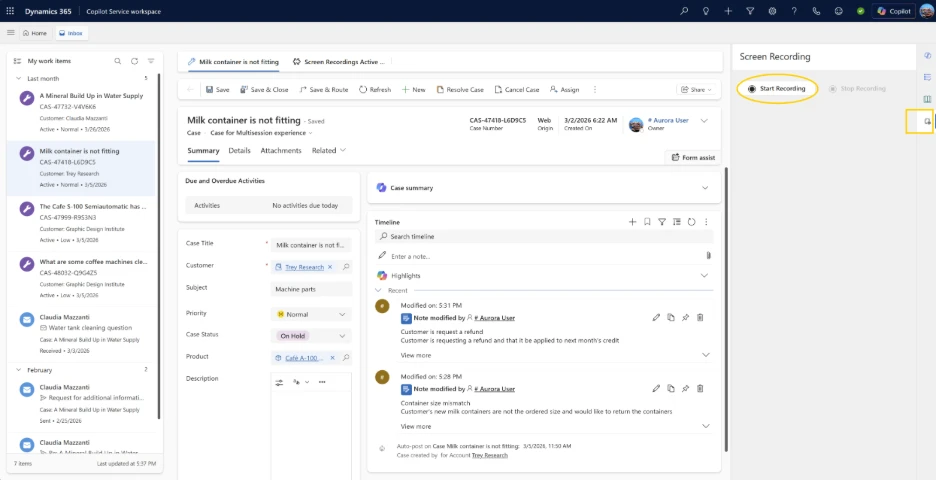
In today’s complex support environments, resolving a customer issue rarely involves a simple, linear process. Agents frequently juggle multiple systems, reference internal knowledge bases, and update records simultaneously while interacting with the customer.
While transcripts, voice recordings, and chat logs are excellent for capturing what was said during a customer interaction, they often fail to capture how the work was actually performed. To bridge this gap, Microsoft has announced the introduction of Screen Recording in Dynamics 365 Customer Service and Dynamics 365 Contact Center.
This highly anticipated capability provides supervisors and compliance teams with secure, structured visibility into the agent’s on-screen workflow, enabling better coaching, objective quality evaluations, and stricter compliance monitoring.
Why Screen Context is a Game Changer
Without visibility into the agent’s screen, supervisors and Quality Assurance (QA) teams are left to infer how a resolution was reached. By adding screen context to the existing call and chat records, organizations can now:
-
Perform Accurate Quality Evaluations: See exactly how agents navigate systems and follow prescribed processes, removing the guesswork from QA.
-
Identify Training Gaps: Easily spot where agents struggle with complex UI navigation, allowing for targeted coaching and process improvements.
-
Reduce Time to Resolution: Analyze workflow breakdowns visually to understand why certain case types take longer to resolve.
-
Validate Compliance: Ensure agents are taking the required on-screen actions in highly regulated environments.
Key Capabilities and Flexibility
Screen Recording was designed as a unified capability serving both Customer Service and Contact Center workloads. It adapts naturally to the different ways agents manage their tasks:
-
Automatic Screen Recording: Can be configured to automatically capture the screen during live call conversations.
-
Manual Screen Recording: Service representatives working on multiple cases or async chats can manually trigger recordings when necessary.
-
Dataverse Storage: All screen recordings are securely uploaded to Microsoft Dataverse, integrating natively with your existing Dynamics 365 data structure.
Secure by Design: Trust and Governance
Because screen recordings inherently capture a wide array of on-screen data—some of which may be highly sensitive—Microsoft built this feature with strict security and governance controls.
-
Role-Based Access Control (RBAC): Access to record, review, or download screen recordings is strictly controlled by role-based permissions.
-
Admin-Managed Configuration: To balance visibility with usability and privacy, administrators maintain full control over the configuration and operational scoping of the recordings.
This design ensures that organizations can unlock deep operational insights without compromising the trust of their agents or violating enterprise and regulatory data policies.
For administrators looking to set this up, step-by-step guidance is available on Microsoft Learn: Configure Screen Recording in Dynamics 365.
To get more such useful information, please follow our LinkedIn page and you can also subscribe our you tube page.
YouTube Link: https://www.youtube.com/@bizcentralorbit
LinkedIn Link: https://www.linkedin.com/company/bizcentralorbit/posts/?feedView=all
If you want more updates and daily Blogs like “Can We Delete Posted Documents in Business Central?” click the link: https://bizcentralorbit.com/can-we-delete-posted-documents-in-business-central/
If you want more Demo and Tutorial videos like “How to create Special Order in Business Central” on Youtube click the link: https://www.youtube.com/watch?v=qFj_ECsOVrY
Raise a support ticket instantly by clicking the link: https://bizcentralorbit.com/contact-us/
Want to analyze any requirement and collaborate? Let’s work together to deliver the best solution! Please submit the details here: https://bizcentralorbit.com/bc-consultants/
The structure and readability of this post are really good.
The practical examples added a lot of value to the article.
Very clean and professional explanation of the topic.
Appreciate the effort put into making this content beginner-friendly.
This post saves a lot of trial and error effort.
Dear http://bizcentralorbit.com/fekal0911 Webmaster
Hi
Submit bizcentralorbit.com in GoogleSearchIndex to be visible in google search results!
Place bizcentralorbit.com now: https://searchregister.info
Hey
Enlist bizcentralorbit.com in GoogleSearchIndex so it can be displayed in online search results!
Add bizcentralorbit.com now: https://searchregister.org
Hi
Feature bizcentralorbit.com in GoogleSearchIndex so it can appear in online search results!
Feature bizcentralorbit.com now: https://searchregister.live
Hi
Register bizcentralorbit.com in GoogleSearchIndex to show up in online search results!
Insert bizcentralorbit.com now: https://searchregister.info
Greetings
List bizcentralorbit.com in Google’s Search Index and have it be visible in Google search results!
Add bizcentralorbit.com today:
helpindex.org
Dear Sir/Madam
List bizcentralorbit.com in Google’s Search Index so it can be visible in online search results!
Register bizcentralorbit.com here:
searchindex.net
Greetings
Register bizcentralorbit.com in Google’s Search Index and have it appear in web search results!
List bizcentralorbit.com here:
helpindex.org
Hi,
I hope you’re doing well.
I wanted to reach out and see if you are interested in improving your website’s http://bizcentralorbit.com visibility on Google and attracting more potential customers through SEO. We offer SEO solutions designed to help businesses increase organic traffic, improve keyword rankings, and generate quality inquiries.
If this sounds interesting, I’d be happy to share our complete SEO packages, activities, timeline, and pricing details for your review.
Looking forward to your response.
Regards,
Arpit
Greetings
Add bizcentralorbit.com in Google’s Search Index so it can show up in Google search results!
Add bizcentralorbit.com today:
indexhelp.pro
This is basically a luxury casino experience from the comfort of my home. The game selection is massive and everything is high quality. nustargameonlinecasino is simply the best.
I was skeptical at first but this platform is legit. The customer service is very helpful and the withdrawal process is quick. Give krmmwin a try if you want a reliable site.
Hi
I wanted to reach out and let you know about our new dog harness. It’s really easy to put on and take off – in just 2 seconds – and it’s personalized for each dog.
Plus, we offer a lifetime warranty so you can be sure your pet is always safe and stylish.
We’ve had a lot of success with it so far and I think your dog would love it.
Get yours today with 50% OFF: https://caredogbest.com
FREE Shipping – TODAY ONLY!
Best,
Thelma
I love how fast the withdrawals are processed. No more waiting for days to get my winnings. Truly a professional service. pkcz777gamelogin
Good Morning,
I hope this email finds you well. I wanted to let you know about our new BANGE backpacks and sling bags that just released.
The bags are waterproof and anti-theft, and have a built-in USB cable that can recharge your phone while you’re on the go.
Both bags are made of durable and high-quality materials, and are perfect for everyday use or travel.
Order yours now at 50% OFF with FREE Shipping: http://bangeshop.com
Thanks and Best Regards,
Charla
Had a lucky streak yesterday and the bonuses were a nice touch. If you are looking for a reliable place to play just go with inyuno777.
Good day
Looking to improve your posture and live a healthier life? Our Medico Postura™ Body Posture Corrector is here to help!
Experience instant posture improvement with Medico Postura™. This easy-to-use device can be worn anywhere, anytime – at home, work, or even while you sleep.
Made from lightweight, breathable fabric, it ensures comfort all day long.
Grab it today at a fantastic 60% OFF: https://medicopostura.com
Plus, enjoy FREE shipping for today only!
Don’t miss out on this amazing deal. Get yours now and start transforming your posture!
Best Wishes,
Shelby
Good day
I wanted to reach out and let you know about our new dog harness. It’s really easy to put on and take off – in just 2 seconds – and it’s personalized for each dog.
Plus, we offer a lifetime warranty so you can be sure your pet is always safe and stylish.
We’ve had a lot of success with it so far and I think your dog would love it.
Get yours today with 50% OFF: https://caredogbest.com
FREE Shipping – TODAY ONLY!
Regards,
Asa
The login process is super quick and I didn’t face any lag. It is definitely one of the best platforms I have used recently. Visit onyxlogin today.
Hey,
I hope you’re doing well. I wanted to let you know about our new BANGE backpacks and sling bags that just released.
Bange is perfect for students, professionals and travelers. The backpacks and sling bags feature a built-in USB charging port, making it easy to charge your devices on the go. Also they are waterproof and anti-theft design, making it ideal for carrying your valuables.
Both bags are made of durable and high-quality materials, and are perfect for everyday use or travel.
Order yours now at 50% OFF with FREE Shipping: http://bangeshop.com
Kind Regards,
Chasity
The bonuses are actually legit! Feeling lucky lately since I started using rich888game. Cheers!
Hi
Looking to improve your posture and live a healthier life? Our Medico Postura™ Body Posture Corrector is here to help!
Experience instant posture improvement with Medico Postura™. This easy-to-use device can be worn anywhere, anytime – at home, work, or even while you sleep.
Made from lightweight, breathable fabric, it ensures comfort all day long.
Grab it today at a fantastic 60% OFF: https://medicopostura.com
Plus, enjoy FREE shipping for today only!
Don’t miss out on this amazing deal. Get yours now and start transforming your posture!
Best Wishes,
Christy
Really impressed with the customer support and the overall vibe of the site. It feels secure and professional, which is all I look for. I’m sticking with 393betlink from now on.
Love how easy it is to navigate the site. I managed to hit a decent jackpot last night and the credit went straight to my account. phjili01 is definitely a winner.
Login is quick and the site is very stable. I didn’t encounter any lags even during peak hours. tania77login is definitely my new favorite spot.
The winning streaks here are insane. I tried a few others but this one feels way more rewarding. Just log into mahagacor77login and see for yourself.
Really impressed with the payout speed here. It is rare to find a site this transparent and fair. I’m definitely recommending ph777zk to my friends.